How to Use Didi in China: Airport Booking, Payment Tips

By Bethy
July 7, 2026

Full guide for foreigners to use Didi China app: foreign phone number login, international card payment, how to book Didi to/from China airports.
What Is Didi App China?

Didi Chuxing, or simply Didi, is the dominant ride-hailing platform in mainland China. It works much like Uber: you enter your pickup and destination, see an upfront price, and get matched with a nearby driver. The service covers economy cars, premium sedans, taxis, carpooling and airport transfers across hundreds of Chinese cities.
For international visitors, Didi is often cheaper and more reliable than hailing a taxi on the street, especially if you don't speak Chinese. The app now offers a full English interface, supports foreign phone number registration, and accepts international bank cards — making it accessible for short-term travelers and business visitors alike.
How to Book Didi Rides To/From Airports
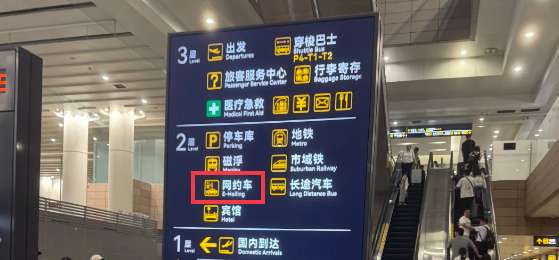
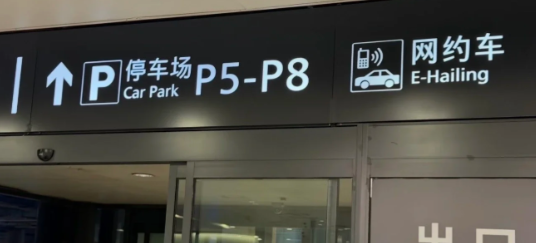
Taking Didi to or from Chinese airports is the most convenient, safest option for foreign travelers. All major airports have clear English & Chinese signage for ride-hailing pickup points.
Step-by-Step Airport Didi Guide
Scenario 1: Get a Didi from Airport (After Landing)
- Prepare first:Collect all your luggage first; do not book a ride on the plane.
- Find pickup zone:Follow airport signs marked Online Car-hailing / 网约车 to designated parking garages (P1/P2) or waiting bays.
- Confirm location on Didi:Open Didi App, the system will auto-locate your airport pickup spot. Fix GPS drift manually if the pin is across the road.
- Place order:Type your destination in English, select vehicle type (Economy/Comfort/Airport Transfer; choose transfer cars for large luggage).
- Meet your driver:Follow in-app navigation to the numbered pillar (A1/B3). Contact drivers via in-app chat (built-in English-Chinese translation) if you cannot find each other.
- Board safely:Verify the car plate and confirm the last 4 digits of your registered phone number before getting in.
Scenario 2: Get a Didi To Airport (Catch a Flight)
- Tap Where to on the homepage, input your airport + exact terminal (e.g. Shanghai Pudong T2).
- Turn on Reserve Scheduled Trip, fill in your flight time. Didi will recommend a proper departure time with airport check-in buffer time.
- Input your flight number: the driver will auto-adjust arrival time for flight delays with no extra fees.
Key Airport Tips & Common Pitfalls
- Best ordering timing:Place your order only when you arrive at the ride-hailing waiting area, to avoid overtime waiting fees.
- Black car warning:Ignore stranger touts at airport exits. Unlicensed private cars are overpriced and unsafe; only use the official Didi App.
- Airport specific hacks
- Shanghai Pudong T2: Pickup at P2 Garage B1/B2. Check the assigned floor on Didi before taking elevators.
- Hangzhou Xiaoshan T3/T4: Indoor GPS is inaccurate. Ask drivers to pick you up at the Departure Floor gate number for easier meeting.
- Ask on-site airport staff for help if you have language barriers.
to Shanghai
to Guangzhou
to Beijing
See all flights


How to Sign Up and Set Up the Didi App
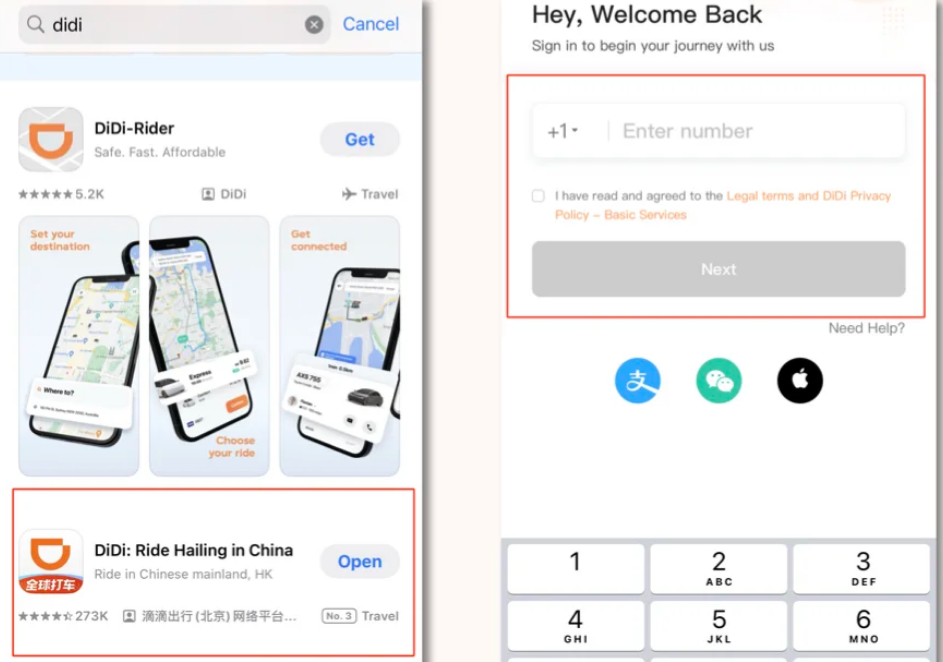
Download and Register
- Download the official Didi Chuxing (滴滴出行) app from the App Store or Google Play.
- Open the app, select your preferred language, and enter your phone number.
- Enter the SMS verification code you receive.
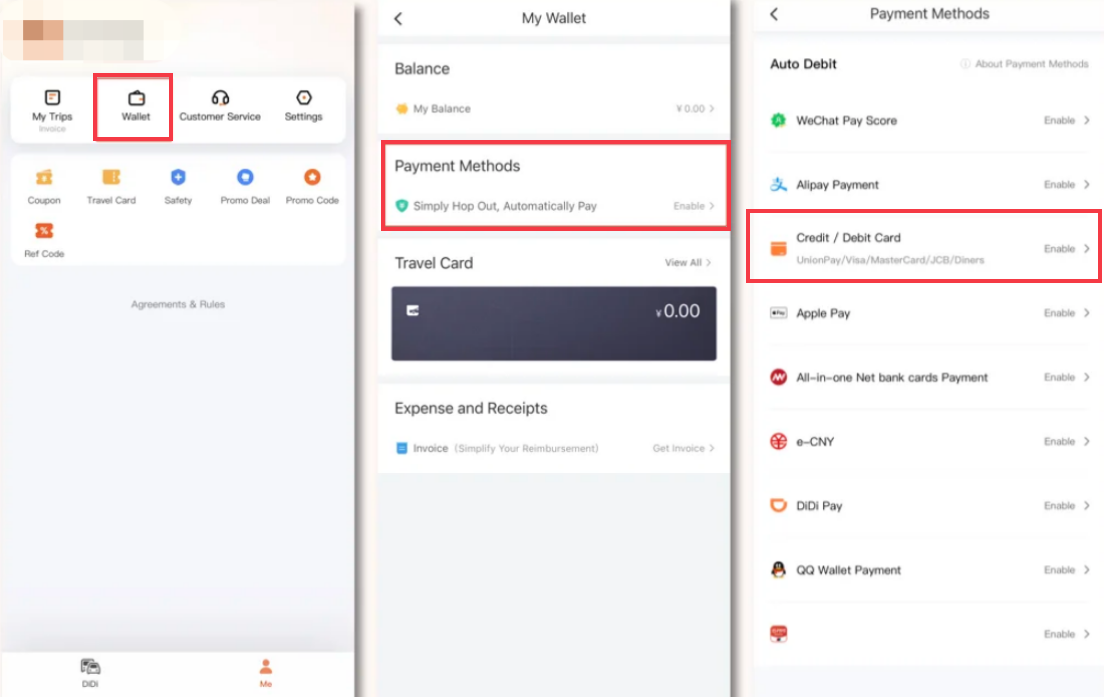
Add a Payment Method
- On the home screen, tap Me in the bottom-right corner.
- Tap Wallet.
- Tap Payment Methods.
- Choose Credit / Debit Card and enter your card details. Visa is widely supported.
- You can also link WeChat Pay as a payment option here.
Switch to English Interface
- Tap Me.
- Tap the Settings icon in the top-right corner.
- Select Multi-language (or General > Language).
- Choose English and confirm. The whole app will switch to English immediately.
How to Book a Ride on Didi
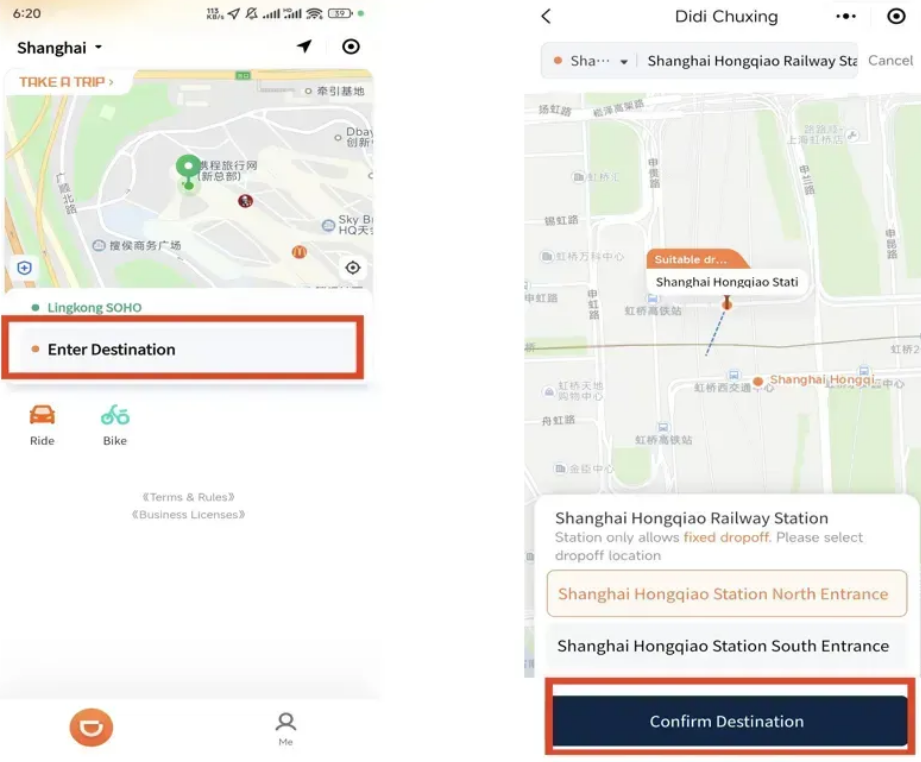
Step 1: Enter Your Pickup and Destination
- On the home screen, tap the Where to? search bar.
- You can type addresses in English or Chinese. The app will show matching results with both language labels.
- Double-check your pickup location — the map will drop a pin on your current position. Drag the pin exactly to where you are standing, not across the street. Many first-time users miss this and end up on the wrong side of a busy road.
- You can save frequent addresses to Favorites for faster booking next time.
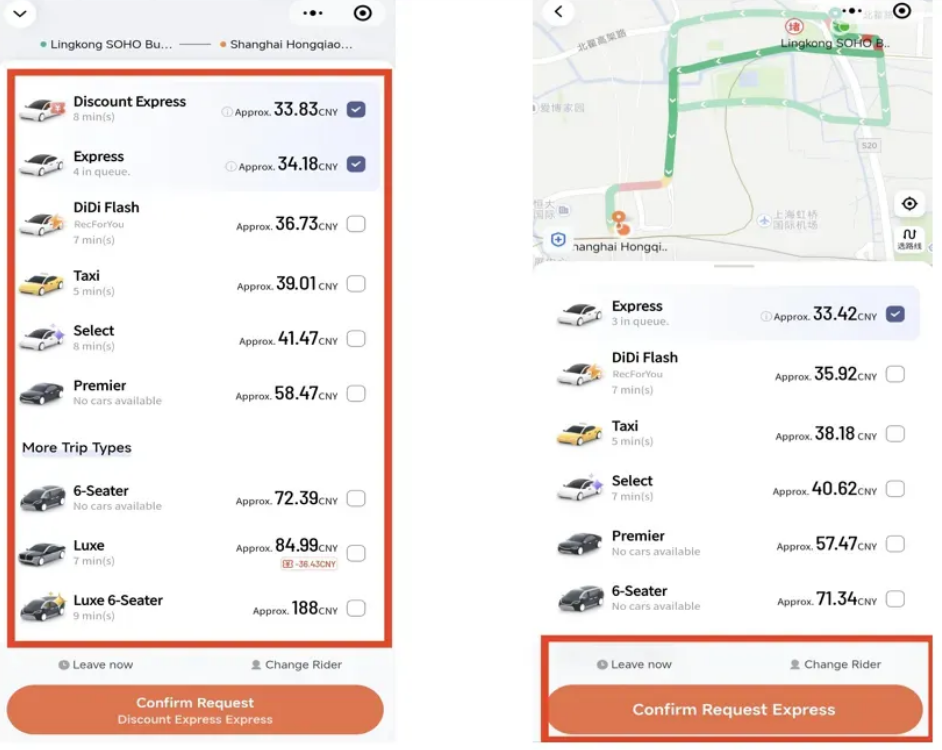
Step 2: Choose Your Ride Type
- Different vehicle classes are shown with estimated prices:
- Express / Economy: Cheapest option, regular sedan.
- Comfort / Premier: Larger car, better service.
- Taxi: Regular city taxi metered fare.
- Carpool: Shared ride at lower cost.
- Selecting more ride types increases your chance of getting a driver quickly.
- Always check the upfront fare before confirming — this is the final price you pay (excluding tolls and surcharges).
Step 3: Confirm and Track Your Driver
- After tapping Confirm, the app matches you with a nearby driver.
- You will see the driver's photo, name, car model, and license plate number.
- A live map shows the driver's location and estimated arrival time.
- You can message or call the driver through the app. Didi's English version includes a built-in real-time translation for text messages, so you can communicate even if the driver only speaks Chinese.
Step 4: Before You Get In
- Match the license plate and car color with what's shown on your screen. Never get into an unmarked car.
- The driver will ask for the last 4 digits of your phone number as verification. You do not need to say your full number.
Step 5: During the Ride
- Watch the live route on the map to confirm you're heading the right way.
- Locate the Safety Center button on the screen. It lets you share your trip with friends, call emergency services with one tap, and access 24/7 customer support.
- Fasten your seatbelt — it is required by law in China.
Step 6: After Arrival
- Payment is charged automatically to your selected method.
- You can rate the driver and report any issues.
- Receipts are available in your trip history, which is very useful for business expense reports.
See all attractions
 928182 booked




Using Didi via WeChat or Alipay (No App Download)
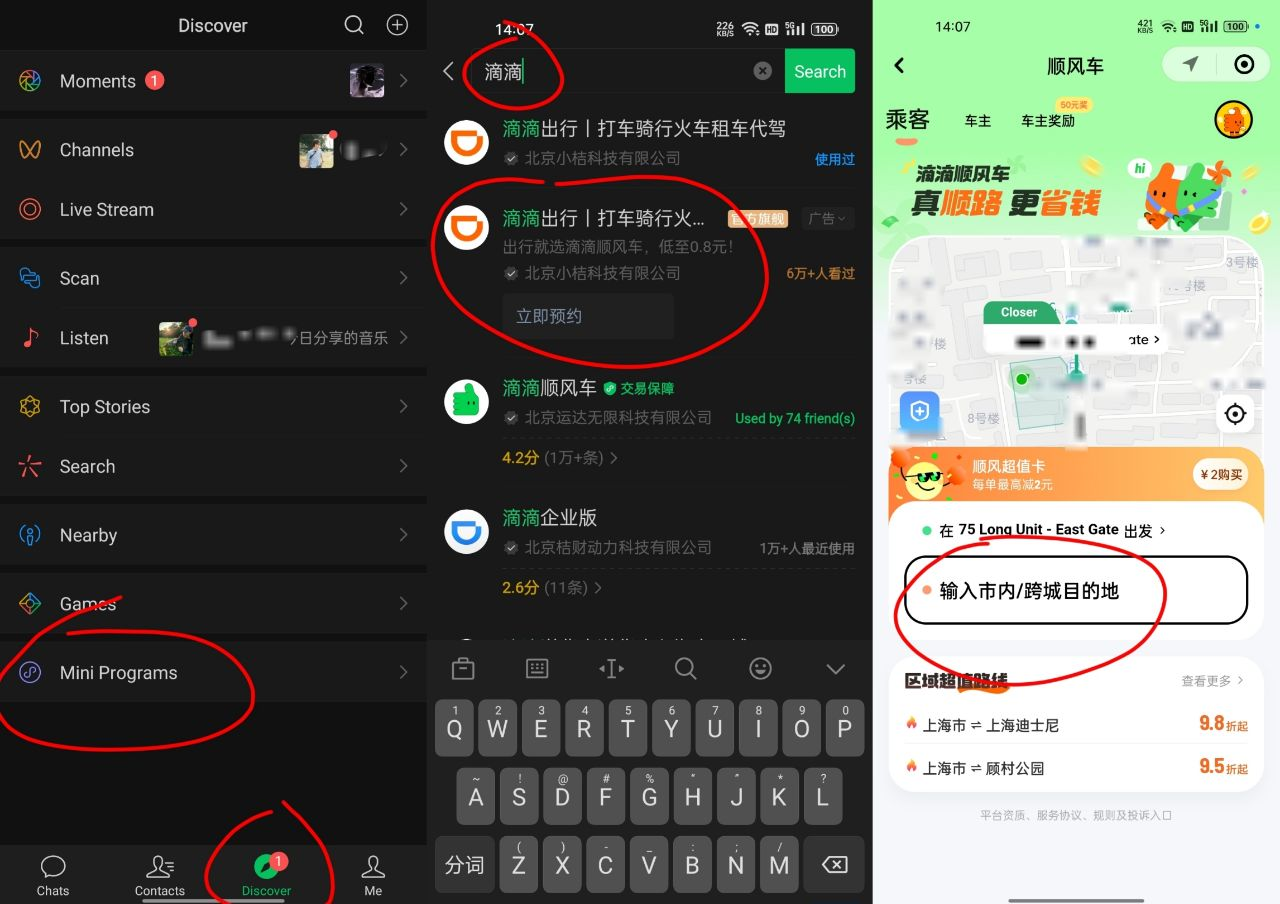
If you already have WeChat or Alipay set up with a working payment method, you can book Didi rides without downloading the separate app.
Didi Via WeChat
- Open WeChat and go to Me > Services (or Wallet).
- Find and tap Didi Chuxing (滴滴出行).
- Enter pickup and destination, then confirm your ride.
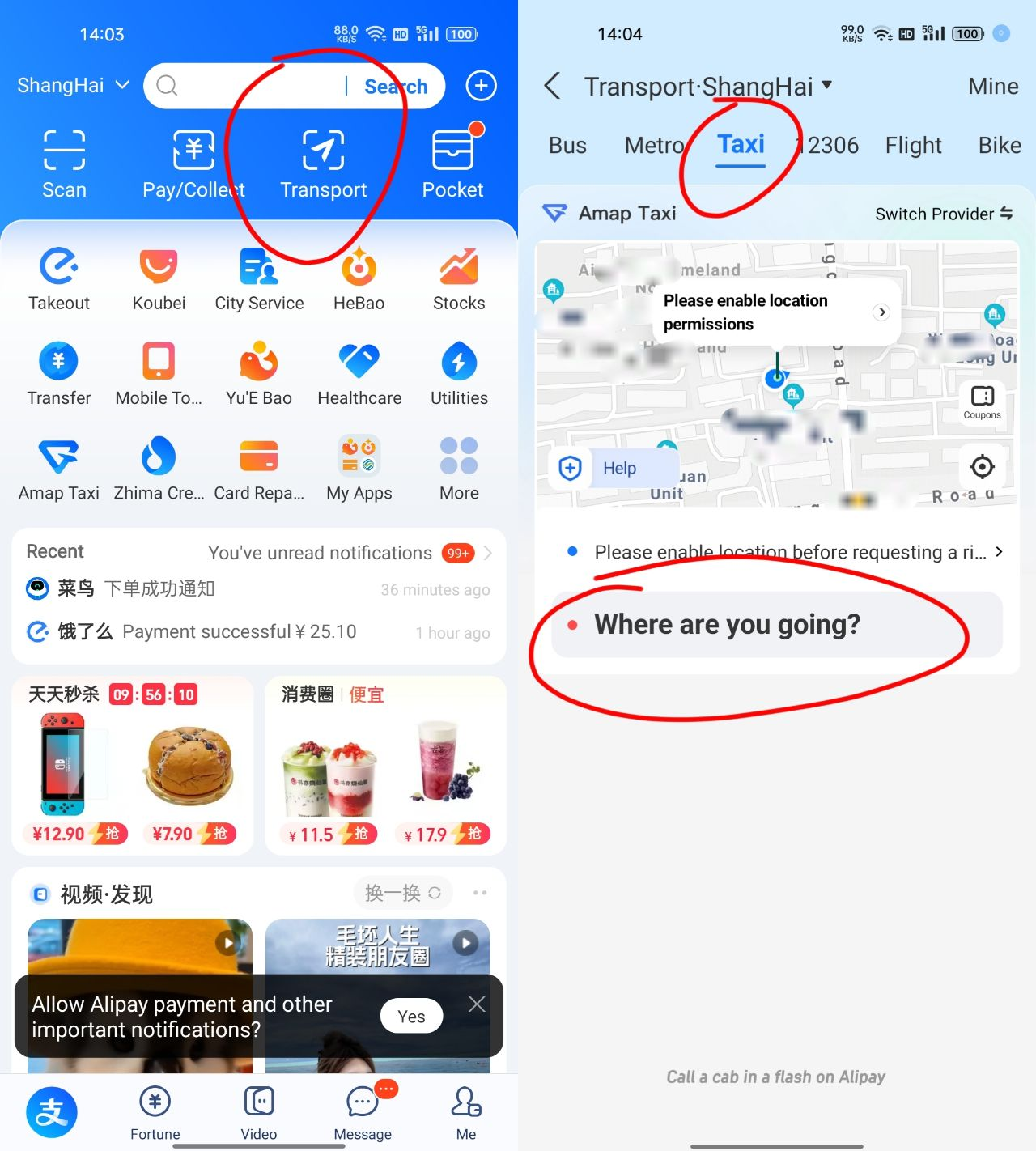
Didi Via Alipay
- Open Alipay and tap Travel on the homepage.
- Select Taxi / Ride-hailing.
- Fill in your route and confirm. You can also book metro, buses, shared bikes and high-speed train tickets through the same Travel hub.
Standalone App vs. Mini-Program: Which Is Better?
Both work for casual rides, but there are important differences:
Standalone Didi App | WeChat / Alipay Mini-program | |
|---|---|---|
English interface | Full, complete English UI | Partial English; some menus remain in Chinese |
Expense reports | Easy — all trips in one history, exportable receipts | Receipts require extra steps to retrieve |
Account issues | Easier to troubleshoot phone number or payment problems | Tied to your WeChat/Alipay account, harder to fix |
Extra features | Favorites, safety tools, airport pickup, pre-booking | Basic ride booking only |
Recommendation for business travelers: Use the standalone Didi App. It makes expense reconciliation much simpler, and you have full control over your trip history and receipts. For casual tourists, WeChat or Alipay works fine for occasional rides.
[10% Off] Best China Hotel Recommendations
Top Shanghai Hotels
Top Beijing Hotels
Top Guangzhou Hotels
See All Hotels























FAQs about DiDi
-
How do I pick up Didi at China airports?
-
Can I use Didi in China with a foreign phone number?
-
What payment methods work on Didi for foreigners?
-
Does the Didi app have an English version?
-
Is it better to use the Didi app or book through WeChat/Alipay?
Disclaimer: This article has been provided by an individual contributor or third party platform. If there is any discrepancy regarding the copyright, please contact us directly and we will delete the content immediately.
Trending
-
Popular Airlines