
Baidu Map App Guide: English Version, Features & Comparisons

By Bethy
May 18, 2026

If you are traveling or living in China, the Baidu Map App is more than just a tool for directions—it is a lifestyle essential. While global apps like Google Maps are often inaccurate or blocked in mainland China, Baidu Map offers the most detailed, real-time data available.
To Beijing
To Shanghai
To Guangzhou
See all flights


What is Baidu Map App?
Baidu Map (百度地图) is a comprehensive mapping and navigation service developed by Baidu. It is used by hundreds of millions of people for everything from daily commutes to finding restaurants. It utilizes advanced AI to provide real-time traffic updates, 3D street views, and high-precision indoor mapping for malls and train stations.
What Functions Does Baidu Map App Have?

Baidu Maps goes far beyond simple point-A-to-point-B navigation. It functions as a super-app for all your travel needs:
1. Multi-Mode Navigation
The app provides precise routing for:
- Driving: Real-time traffic, lane-level guidance, and speed camera alerts.
- Public Transit: Real-time bus arrivals and subway transfer guides (including which carriage is closest to your exit).
- Walking & Cycling: AR (Augmented Reality) navigation that overlays arrows onto your camera view.
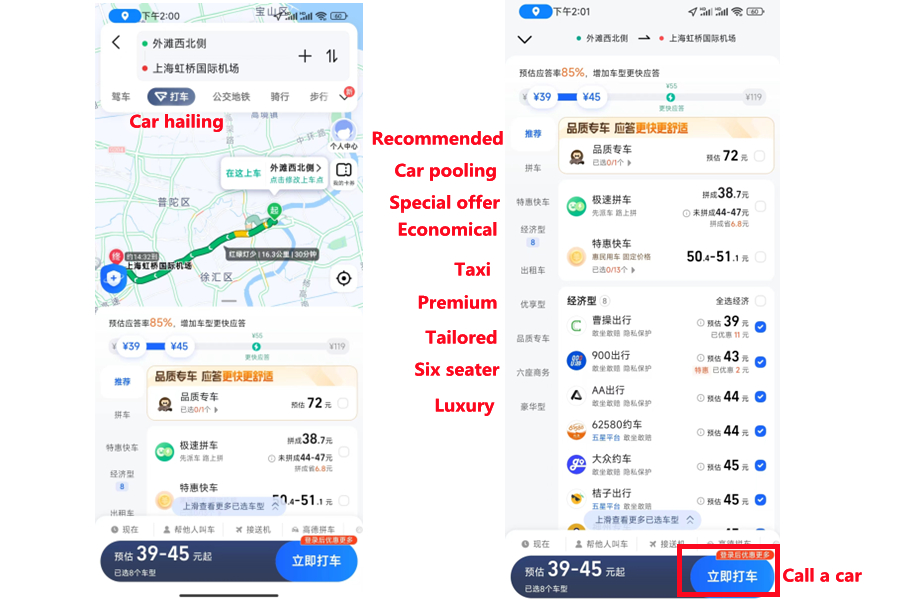
2. Integrated Ride-Hailing (打车)
You don’t need a separate app to call a car. Within Baidu Map, the 打车 button allows you to compare prices across multiple platforms (like DiDi, CaoCao, and local taxis) and book a ride directly.
3. Lifestyle and POI (Points of Interest)
- Food & Drink: View menus, photos, and ratings for millions of restaurants.
- Hotel Booking: Integrated booking via platforms like Trip.com.
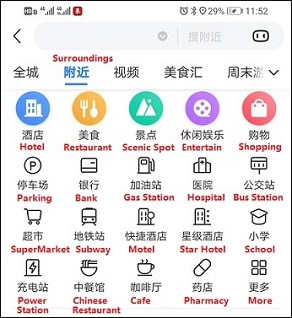
- Nearby: Quickly find the nearest ATM, public restroom, or charging station.
Does Baidu Map App Have an English Version?
Source from Baidu
The short answer is no. Despite some localized "Beijing Map" projects or web-based pilots, the flagship Baidu Map App does not have a global English toggle in its settings. The entire user interface, voice prompts, and menu systems are in Mandarin Chinese.
Why is there no English version?
The app is built primarily for the domestic market, which has complex address systems and hyper-local data that are difficult to translate accurately in real-time.
How to "Switch" or Work Around the Language Barrier
While you cannot "switch" the app to English, you can navigate it using these strategies:
- Pinyin Search: You can type names in Romanized Chinese (e.g., "Tiananmen") and the app will recognize the location.
- Visual Translation: Use a secondary phone or a screen translator (like "Instant Translate on Screen") to translate the buttons live.
- Recognize Icons: The icons for walking (🚶), bus (🚌), and car (🚗) are universal.
- Copy-Paste Addresses: Copy Chinese addresses from your hotel or booking site and paste them directly into the Baidu search bar.
How to Use the Baidu Map App?
- Download: Available on the Apple App Store and Android (via Baidu’s website or local app stores).
- Set Destination: Tap the top search bar. Type the Pinyin or paste the Chinese address.
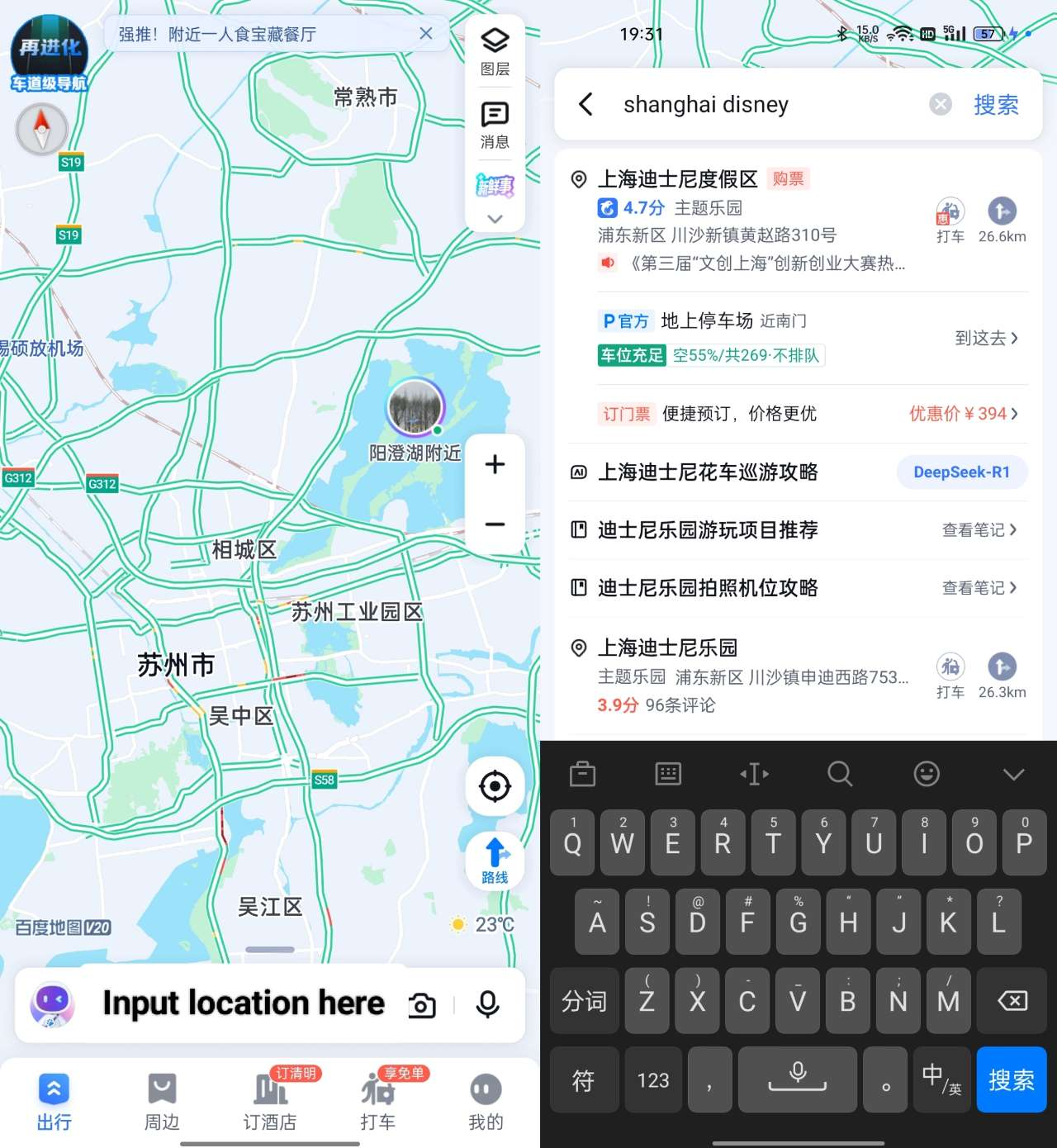
- Choose Route: Tap the blue 路线 (Route) button.
- Select Mode: Tap the icons at the top for Car, Bus, or Walking.
- Start: Tap the large blue button 开始导航 (Start Navigation) at the bottom.
Baidu Map vs. Gaode Map (Amap) vs. Apple Maps in China

Choosing the right map depends on your language comfort and your device.
Feature | Baidu Map (百度地图) | Gaode Map (高德/Amap) | Apple Maps (in China) |
Interface Language | Strictly Chinese | Mostly Chinese (Some English in Int'l Version) | Full English |
Data Accuracy | Excellent (Best for Cities) | Excellent (Best for Drivers) | Good (Uses Gaode Data) |
Ride-Hailing | Integrated (Very Strong) | Integrated (Very Strong) | None |
Public Transit | Highly Detailed | Highly Detailed | Basic/Good |
3D / Street View | Superior 360° Views | Strong | Limited in China |
Best For... | Lifestyle & Public Transit | Drivers & Rural areas | English Speakers / Tourists |
See all attractions
 999089 booked




[10% Off] Best China Hotel Recommendations
Top Shanghai Hotels
Top Beijing Hotels
Top Guangzhou Hotels
See All Hotels























FAQs about Baidu Map
-
Is the Baidu Map app free?
-
Can I use Baidu Map without a VPN in China?
-
Does Baidu Map work outside of China?
-
How do I pay for the Ride-hail service in Baidu?
-
Is Baidu Map better than Google Maps in China?
-
Can I download maps for offline use?
Disclaimer: This article has been provided by an individual contributor or third party platform. If there is any discrepancy regarding the copyright, please contact us directly and we will delete the content immediately.
Trending
-
Popular Airlines
-
Popular Cities