Dianping App Guide for Foreigners: How to Use Dianping in China

By Bethy
July 6, 2026
I’ve put together this practical Dianping guide for foreigners traveling or living in China. It walks you through every step of using the app, from initial setup to finding restaurants and claiming discounts, even if you have no Chinese reading skills.
to Shanghai
to Guangzhou
to Beijing
See all flights


What is Dianping

Dianping is China’s largest local lifestyle services platform, combining the core functions of a review site and a group discount platform. It covers restaurants, tourist attractions, hotels, beauty services, entertainment venues and more.
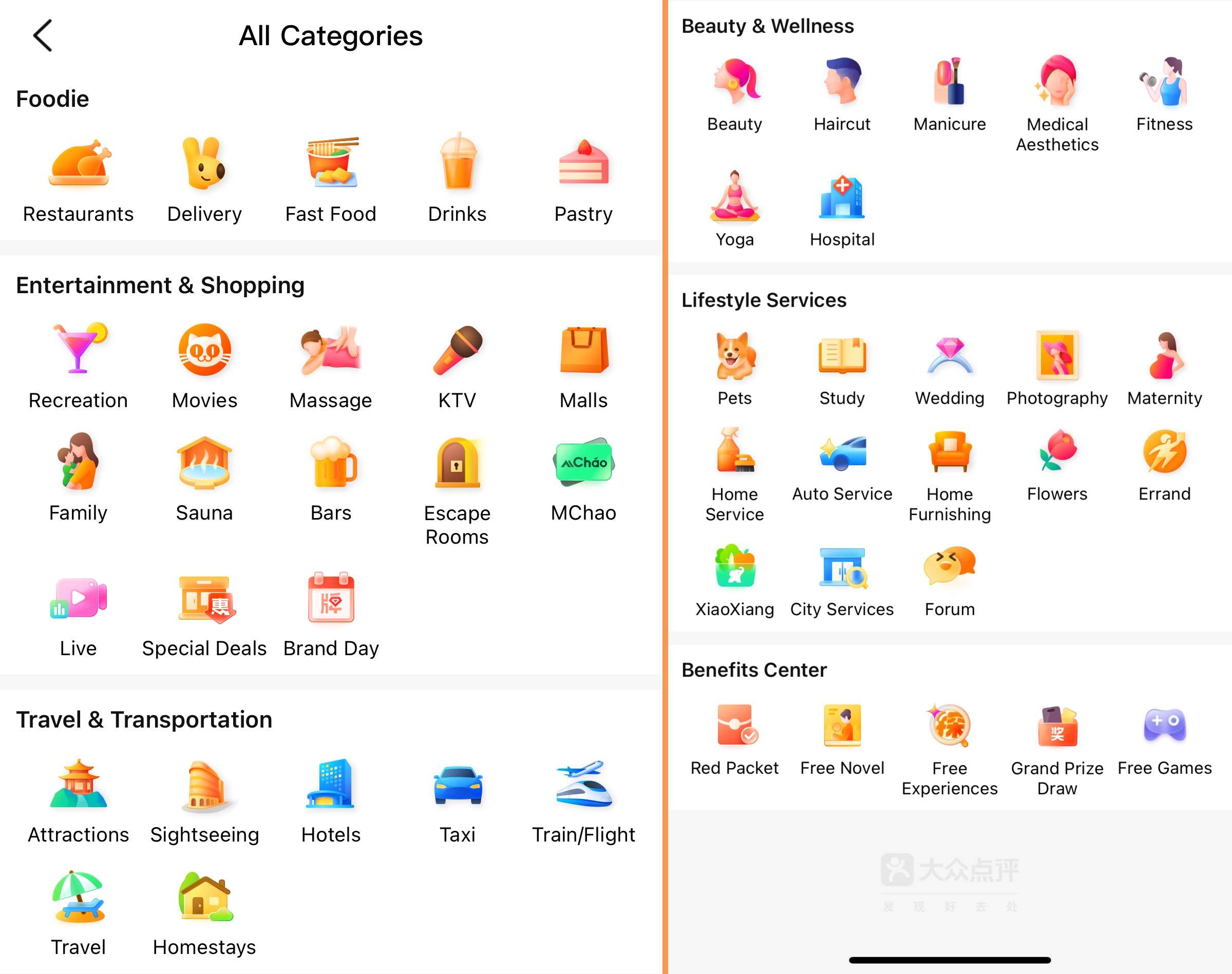
On top of user reviews and business information, the app offers online reservations, in-app queuing and heavily discounted dining deals. For restaurants, most venues launch set meal vouchers on Dianping that cost far less than ordering dishes individually, while the food quality and portion sizes are identical to regular à la carte orders. These high-value deals are one of the app’s most widely used features.
How to Use Dianping for Dining
1. Search for nearby restaurants
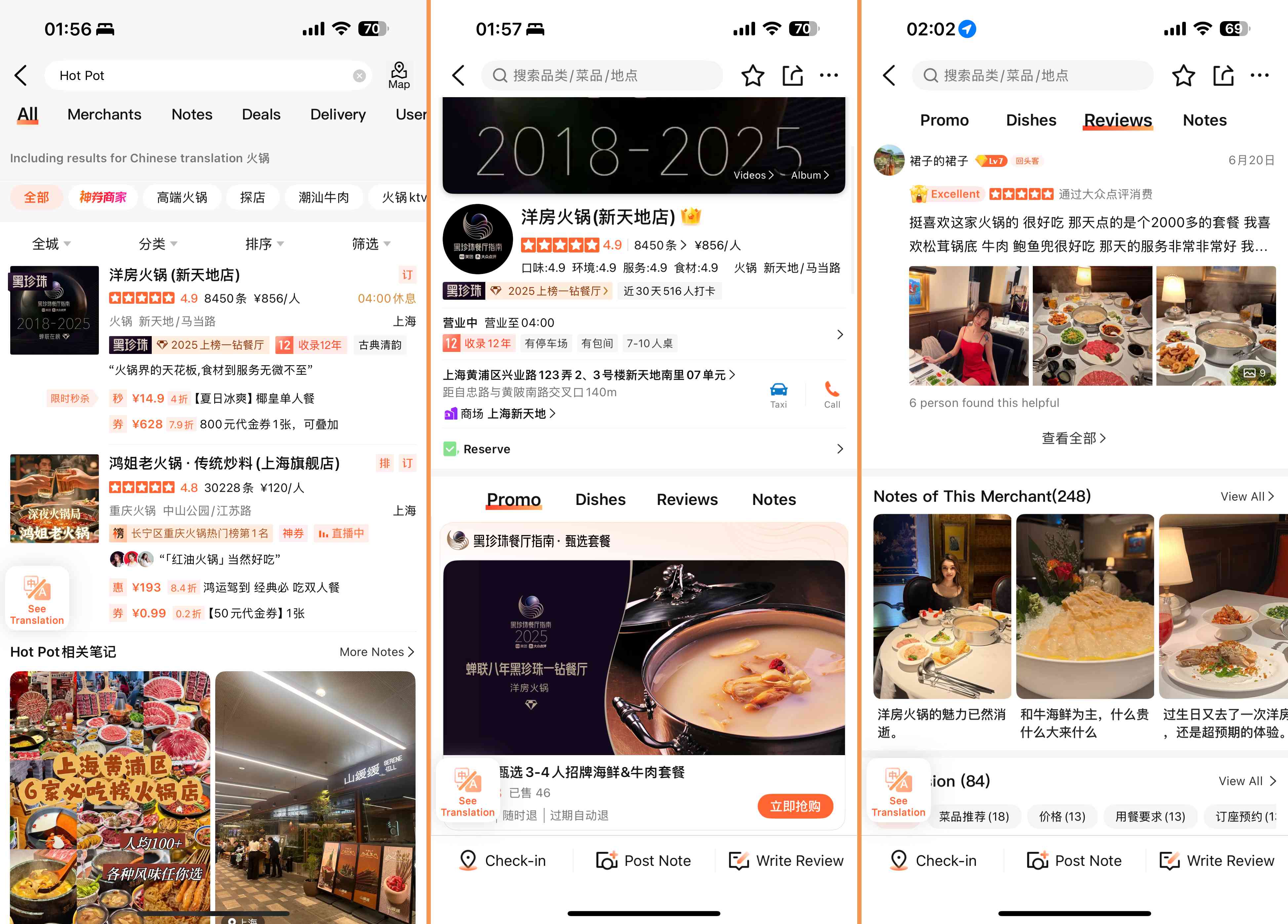
On the homepage, use the top search bar to look for food with English keywords. Common terms like “hotpot near me”, “brunch”, “vegetarian” all work properly. You can also browse by tapping the food category icons below the search bar.
After getting results, use the filter function to sort by rating, distance from your location, or average price per person to narrow down options that fit your needs.
2. Reserve, queue and navigate to the restaurant
For popular restaurants, you can make reservations or join the waiting queue directly in the app:
- On the restaurant’s detail page, look for buttons labeled “Reserve” or “Queue”.
- For reservations, select your desired date, time and number of guests. For queuing, take a virtual queue number and track real-time waiting status in the app.
- To get to the restaurant, copy the Chinese address from the page and paste it into a local navigation app such as Baidu Maps or Amap, which supports walking, public transit and driving directions.
Not every restaurant offers online reservation or queuing. Small local eateries usually only accept walk-ins or phone bookings.
3. Use group buy deals and coupons
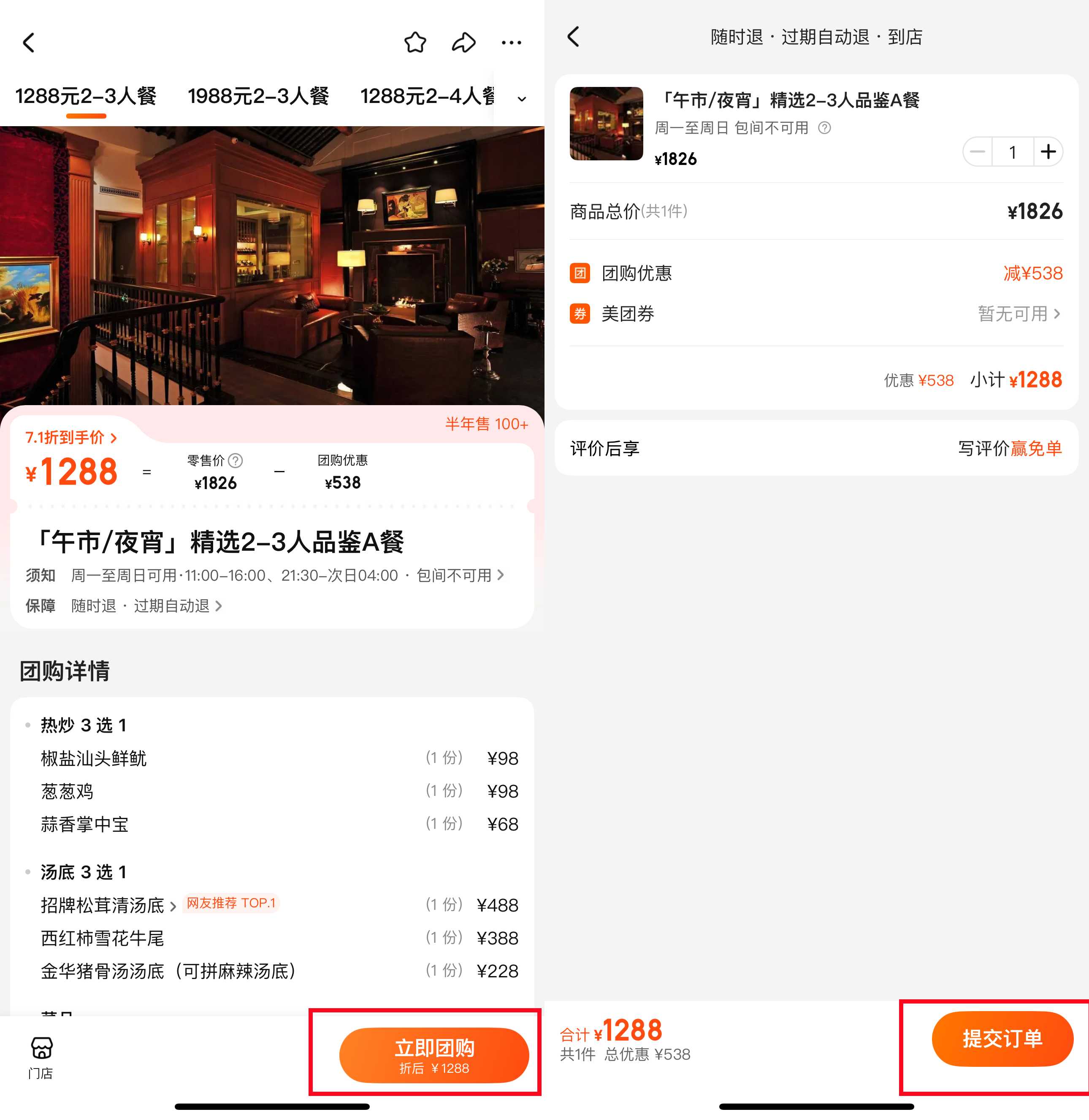
Group buy set meals are the most cost-effective way to dine out with Dianping:
- On the homepage, look for sections labeled “Group Buy” or “Specials” to browse discounted deals. You can also find all available vouchers directly on a restaurant’s detail page.
- These set meals include fixed dishes at a much lower price than ordering the same items separately. The food quality and serving size are exactly the same as regular orders.
- Before purchasing, always check the valid period, available dining time slots, and refund policy (such as whether unused vouchers are refundable after expiration).
- After payment, you will receive a voucher code. Show this code to the restaurant staff when you arrive for verification.
The app also runs “Free Trial” activities, which work as lotteries for free meals or services. You can enter for a chance to win, but spots are limited and not every participant will be selected. Always read the full rules before joining.
4. Save places and use reviews to make decisions
- Tap the “Save” button on any restaurant page to add it to your saved list. You can create custom lists such as “city to-try spots” or “date night venues” to organize your options.
- Check restaurant tags such as “Family-friendly”, “Good for groups” or “Quiet” to filter venues that match your specific scenario.
- Do not rely only on star ratings. Open recent customer reviews and user-uploaded photos to get a more realistic view of the restaurant. If you encounter Chinese text in reviews, you can use the in-app translate button or your phone’s built-in translation tool.
See all attractions
 941911 booked




How to Download Dianping

- For iOS users: Search “Dianping” in the App Store. If your App Store region is set outside China, you may need to switch to the China region to find and download the app.
- For Android users: You can download the app from major Chinese Android app markets, or from the official Dianping website.
How to Switch Dianping to English Interface
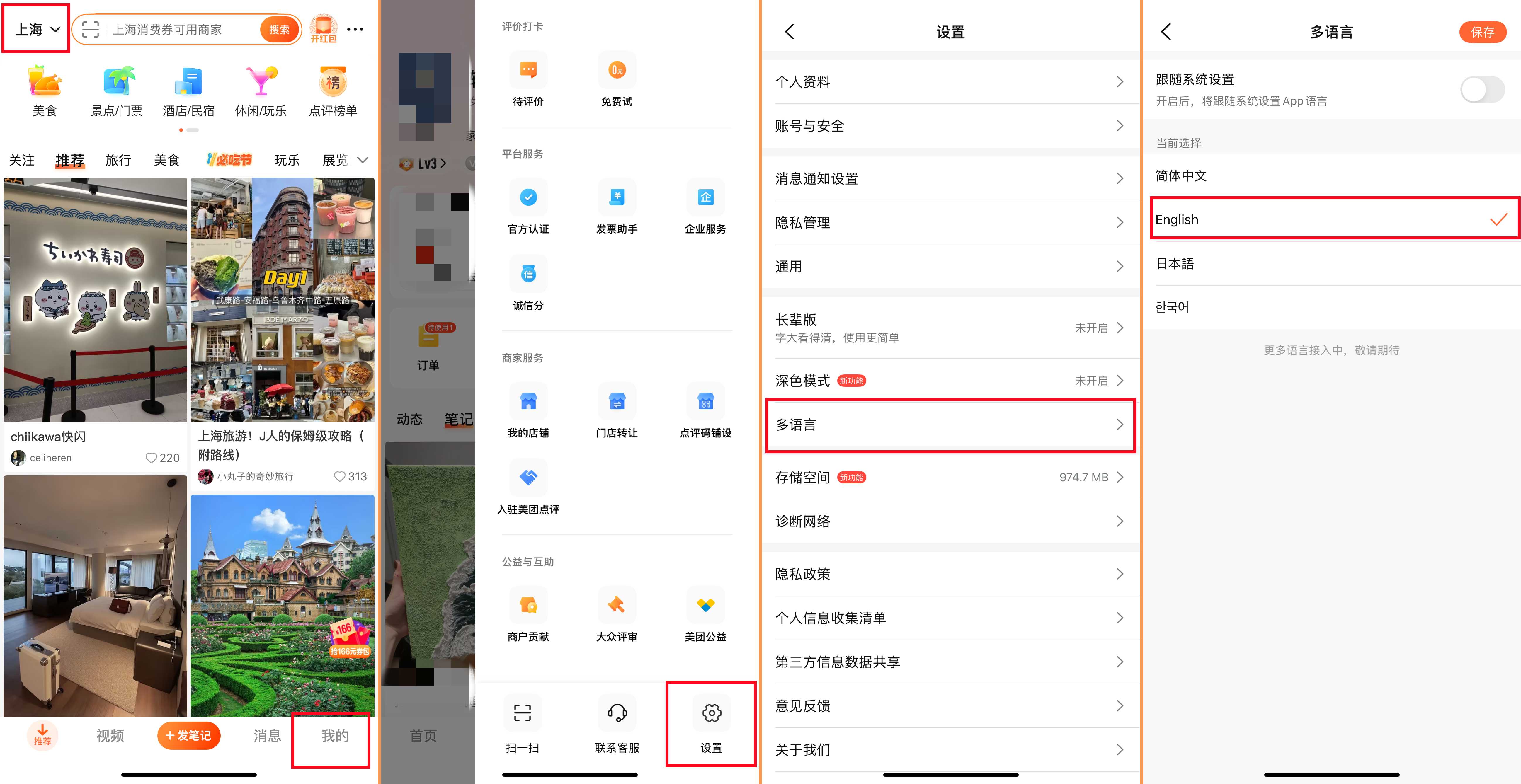
Dianping has a built-in English mode for core functions. You can change the language in three steps:
- Open the app and tap the Settings button in the top right corner.
- Find and tap the “Language” option.
- Select “English” from the list, and the interface will update automatically.
Note that user-generated reviews and some individual restaurant descriptions may still appear in Chinese, but all navigation buttons and core function menus will be displayed in English.
Sign Up and Log In Dianping
You can register and log in with either a foreign phone number or a WeChat account.
- Foreign phone number: On the login page, select “Phone number”, tap the country code selector to pick your region, enter your phone number, and complete verification via the SMS code you receive. Phone numbers from most countries are supported.
- WeChat login: Tap “Log in with WeChat” and allow authorization when prompted. This is the more convenient option if you already use WeChat during your time in China.
How to Pay in Dianping? Payment Methods
Dianping does not support direct binding of foreign credit cards for in-app payments. All transactions as of now are processed through third-party payment tools:
- The primary payment channels are WeChat Pay and Alipay. You can link your foreign credit card to your WeChat Pay or Alipay account first, then use these services to pay for group buy vouchers, restaurant bills and other orders on Dianping.
- Chinese domestic bank cards linked to WeChat Pay or Alipay are also accepted.
China Food Apps: Dianping vs Meituan vs Taobao Flash Deals

Many people ask how Dianping compares to other popular Chinese food and lifestyle apps. The three major platforms have very different core focuses, and you do not need to download all of them. Here is a clear breakdown based on actual use cases.
- Dianping is built for discovery and in-store consumption. It has the largest database of user reviews, real customer photos and authoritative rankings such as the annual Must-Eat List. Its strongest features are restaurant research, in-store group buy deals, table reservations and virtual queuing. It does offer food delivery, but that is not its primary function. This is the app you want when you are deciding where to eat and looking for the best value in-store deals.
- Meituan is transaction-focused and centered on instant services. Food delivery is its core function, and it also covers flash grocery delivery, ride-hailing and more. It does have in-store group buy options, but the review content and restaurant discovery features are far less detailed than Dianping. Use this app if you mainly want to order food delivery, book travel services or complete purchases quickly. Dianping and Meituan are under the same corporate group, so some merchant information and deals are shared between the two, but their interface logic and user focus remain separate.
- Taobao Flash Deals, previously known as Ele.me, is an Alibaba-owned platform focused entirely on food delivery and instant retail. It delivers restaurant meals, fresh groceries, daily necessities and more, usually within 30 minutes. It is deeply integrated with the Taobao e-commerce ecosystem, but has almost no in-store dining or review features. This is the right choice if your primary need is ordering food or daily items to your address, and you prefer the Taobao account system.
For most foreigners traveling or living in China, Dianping is the most essential one to install first for dining out and exploring the city. You can add Meituan or Taobao Flash Deals later if you need regular food delivery.
[Discount] Best China Hotel Recommendations
Top Shanghai Hotels
Top Beijing Hotels
Top Guangzhou Hotels
See All Hotels























FAQs about Dianping App in China
-
Can I sign up for Dianping with a foreign phone number?
-
Does Dianping accept foreign credit cards directly?
-
Is the entire Dianping app available in English?
-
Are group buy set meals lower quality than à la carte orders?
-
Can I order food delivery on Dianping?
Disclaimer: This article has been provided by an individual contributor or third party platform. If there is any discrepancy regarding the copyright, please contact us directly and we will delete the content immediately.
Trending Searches
-
Popular Airlines
-
Popular Cities