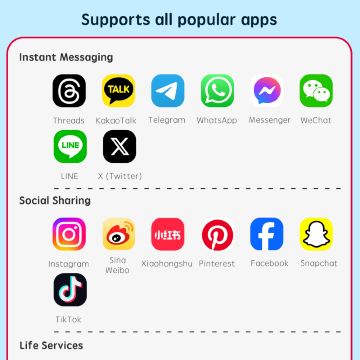
Taiwan 5G eSIM | Daily Plan / Total Data Plan | TikTok Accessible | 1–180 Days | Calendar Day Billing | QR Code
View all 2 photos

Taiwan 5G eSIM | Daily Plan / Total Data Plan | TikTok Accessible | 1–180 Days | Calendar Day Billing | QR Code

4.6/5
Good
(269 reviews)
5K+ booked
Use anytime during validity
Book now for today
Booking confirmation
Free cancellation by 00:00, 1 day before the expiration date
From
€0.11
Limited-time sale
52% off
Device info

Product Description


Compatible Devices

China Telecom version phones and locked devices are not supported. For contract phones, please check with your contract carrier for availability.


Installation Times

Each QR code can be installed only once on the same device. If the eSIM is accidentally deleted from the device, communication service will no longer be available.

The eSIM will be locked to the device after first installation and cannot be transferred or reinstalled on another device.

To prevent unsuccessful eSIM binding, please save the eSIM QR Code in advance.


Signal Coverage

Taiwan, China: CTM-5G
Product details

Show less
Validity period
Valid for 30 days from the booking date, Valid for 1 use(s) only
What's included
eSIM+data package
Calls, text messages
How to use
Instructions
How to Activate
[Install eSIM]
1. Open the QR code attachment in your order on the Trip.com App, and print it out or save it to another electronic device in advance.
(Devices running iOS 17 or above and some Android phones can save the QR code image directly to the device.)
2. Go to Cellular in Settings (iOS) or SIM Card Manager (Android).
3. With your device connected to the Internet, tap Add Cellular (iOS) or Add SIM Card (Android), then scan the QR code to install.
4. If scanning fails, you may install by entering the SM-DP+ Address and Activation Code from your order confirmation.
5. If steps 3 or 4 fail, your device may be network-locked by your home carrier (unable to use other carrier bands). Please contact your carrier to unlock it before using the eSIM.
 
[Use eSIM]
1. Turn off your primary SIM card and enable the eSIM network.
2. Activate Cellular (iOS) or SIM Card (Android).
3. Turn on Data Roaming.
4. If you still cannot access the Internet after the above settings, please configure the APN and restart your device. See details below.
 
[About APN]
1. For multi-country/region eSIM plans, if you cannot connect to the network upon arriving in a new area, manually switch the APN (normally switches automatically).
2. Path: Cellular Number – Cellular Data Network, or Mobile Network – Mobile Data Network, or Mobile Service – Mobile Data Network.
3. Enter APN: ctm-mobile
4. Restart your device.
 
Can I insert the SIM card in advance?
Do not insert the SIM card within mainland China in advance to avoid high international roaming charges. Insertion is only allowed after arriving at your destination.
 
Recharge
This product does not support recharging.
Change & cancellation policies
If a cancellation request is submitted before 00:00, 1 day(s) prior to the expiration date, no cancellation fee will be charged.
If a cancellation request is submitted after 00:00 1 day(s) before the expiration date, a fee of 100% will be charged.
This product cannot be canceled after activation.
If a discount is applied, the cancellation fee will be calculated based on the original price before the discount and will not exceed the amount paid.
Partial refund is not available.
Important note

[Set Up eSIM]

An internet connection is required to install the eSIM. Please confirm whether the eSIM you purchased can be installed before departure or only after arriving at your destination. Installing it in a non-destination country/region will cause the eSIM to become invalid or start the usage period in advance.


[Enable Data Roaming]

Please ensure that the "Data Roaming" option for the eSIM is turned on.


[Do Not Delete the eSIM After Installation]

Each QR code can only be installed once. If the eSIM is deleted from your device, we will not be able to assist you further.

FAQ