Trip.com Customer Care: Hotline & Live Chat

By Bethy
April 13, 2026

Learn how to contact Trip.com Customer Care via call, free VoIP, live chat, and more.
See all flights


Trip.com Customer Care Options at a Glance

No matter which option you choose, Trip.com's support team is available around the clock for the most common travel bookings.
Method | Best For | Cost | Availability |
|---|---|---|---|
Calling from India | Charges may apply when making international calls | 24/7 for flights/hotels/trains/cars; 6:30 AM–11:30 PM for other bookings | |
Calling from outside India | Charges may apply when making international calls | Same hours as above | |
VoIP/Internet Call | Free calling from anywhere | Free (uses data/WiFi) | 24/7 |
Live Chat | Quick questions, written records, when you can't talk | Free | 24/7 |
Where to Find Trip.com Customer Care
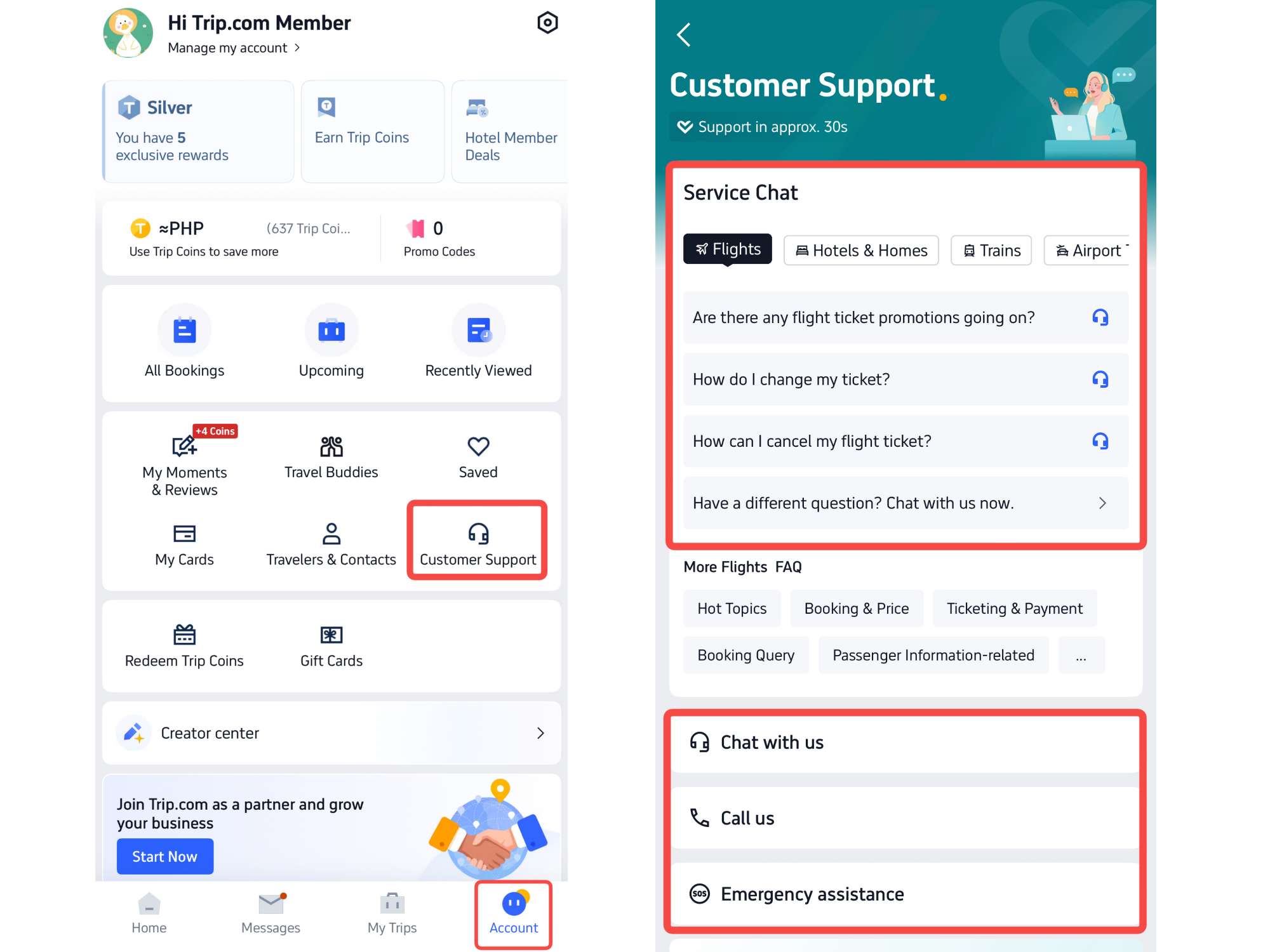
Everything begins in the Trip.com app. Once you log in, tap Account at the bottom of the screen, then look for the Customer Support button. This opens up all your support options in one place.
You'll see three main choices: Chat With Us, Call Us, and Emergency Assistance. Each serves a different purpose depending on what you need.
Trip.com Customer Care 1: Call Trip.com Hotline Directly
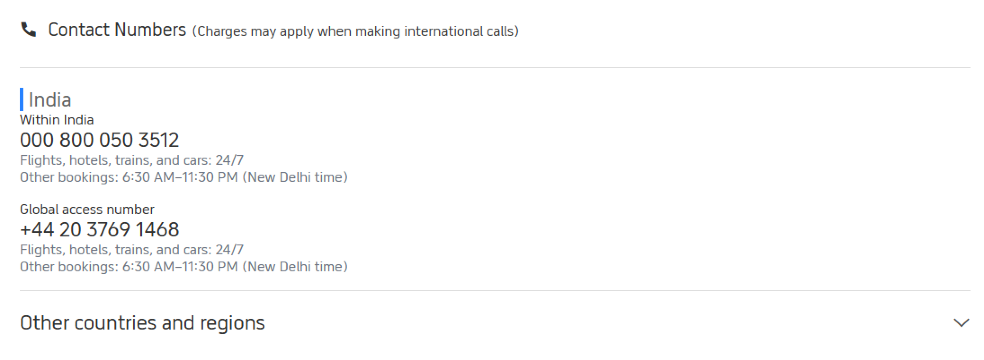
The Trip.com call number may change, please refer to Trip.com lastest phone number.
Sometimes you just need to talk to a real person. Trip.com offers phone support with dedicated numbers for different regions.
Trip.com Call Center For India Users
If you're calling from within India, dial Trip.com India local number. This is a toll-free number that connects you directly to Trip.com's support team.
The service hours are:
- Flights, hotels, trains, and cars: 24 hours a day, 7 days a week
- Other bookings (attractions, tours, etc.): 6:30 AM to 11:30 PM New Delhi time
If you're traveling abroad and need to call from outside India, use the Trip.com global access number. The same service hours apply.
Trip.com Call Center For Other Countries and Regions
If you're traveling to or from another country, you can find local numbers by tapping "Other countries and regions" in the Call Us section. This expands a list showing support numbers for over 40 countries including the United States, United Kingdom, Singapore, Australia, and many others. Each listing shows the local number, service hours in local time, and what types of bookings are supported.
Trip.com Customer Care 2: Make a Free Call Online (VoIP)
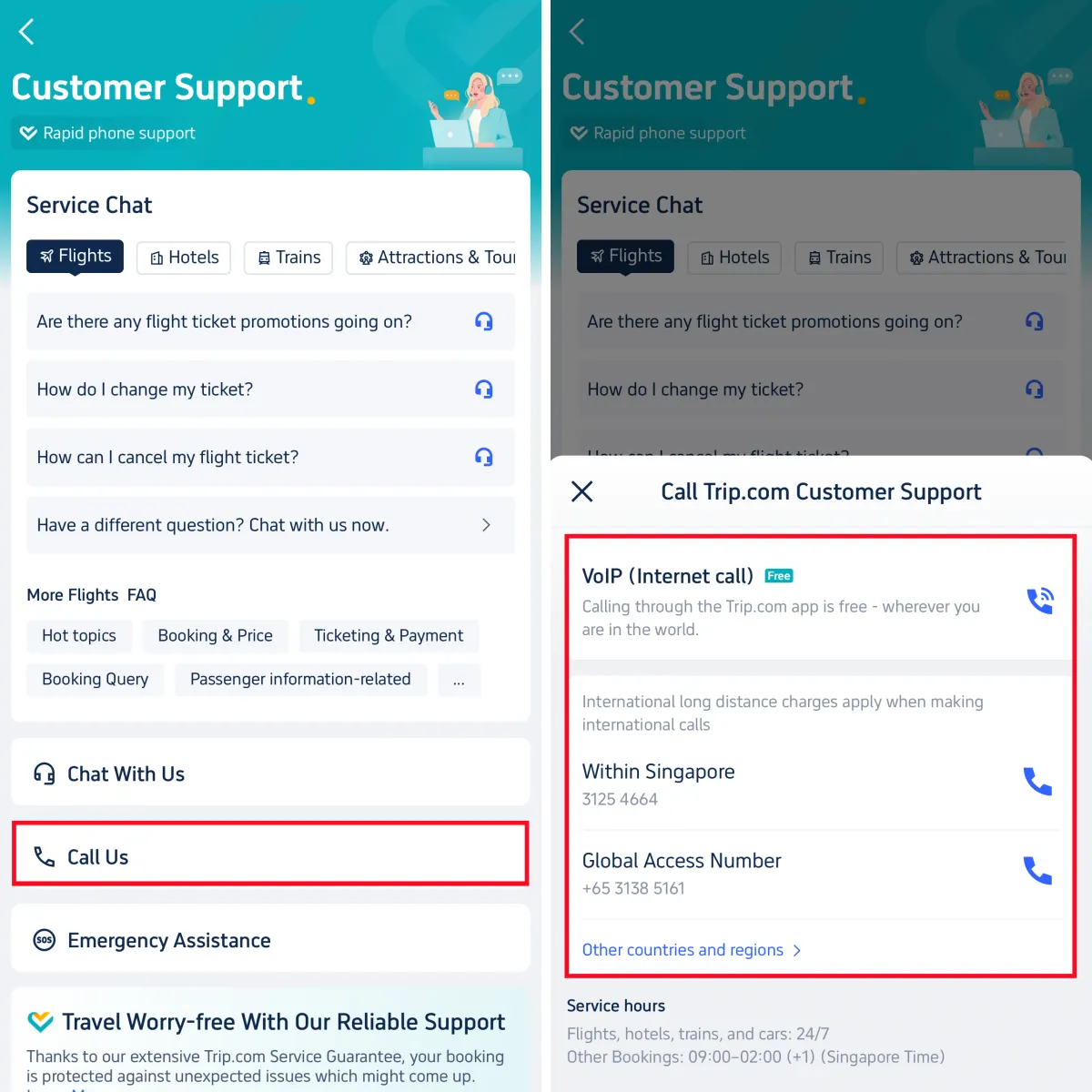
Don't want to use your phone minutes or dealing with international call charges? The app offers a free alternative. Tap Call Us, then select VoIP (Internet Call). This feature lets you make voice calls directly through the Trip.com app using your WiFi or mobile data—no phone charges apply.
Here's how it works:
- Select your issue type from the dropdown (like "Booking Change" or "Refund Request")
- Enter your booking ID if you have one
- Add a brief description of your problem
- Tap "Connect"
You'll typically reach a live agent within 1 to 5 minutes. Since you're logged into the app, the agent can immediately see your booking details, so you won't need to repeat information like your name or reservation number.
This works from anywhere in the world as long as you have an internet connection.
See all attractions
 2570 booked






Trip.com Customer Care 3: Live Chat Support (Text with a Live Agent)
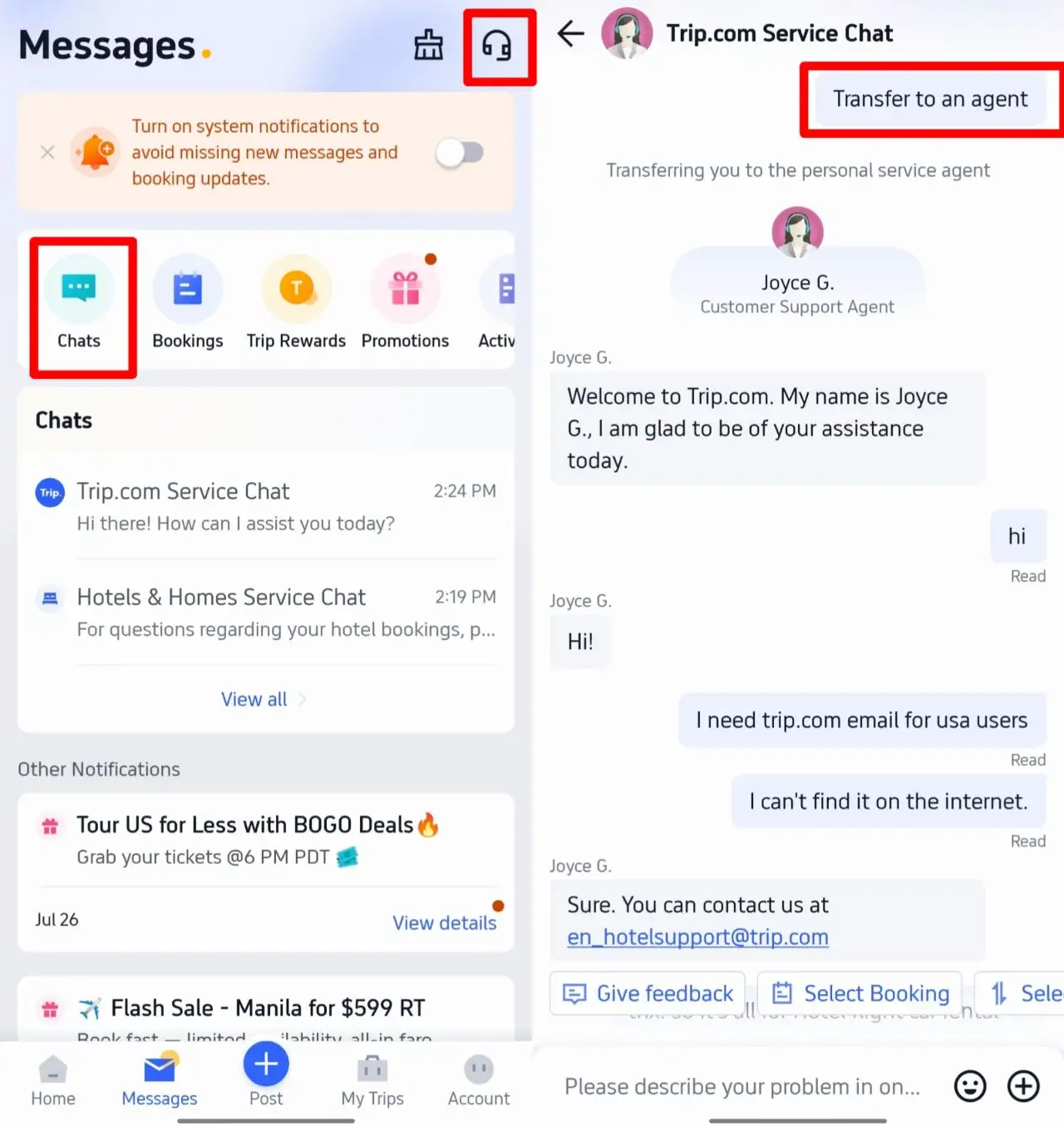
If you don’t want to talk on the phone, live chat is a quiet, convenient option. You can type your questions and get help from a real agent quickly.
How to use live chat on Trip.com
- Open the Trip.com app and go to Messages or Customer Support.
- Tap Chat With Us.
- Pick the category that matches your issue (flights, hotels, trains, etc.).
- To skip the chatbot and speak to a human, type: Transfer to an agent.
Support is 24/7 for flights, hotels, trains, and car rentals. For other bookings, hours follow the local schedule listed earlier.
What Trip.com Customer Care Can Help You With
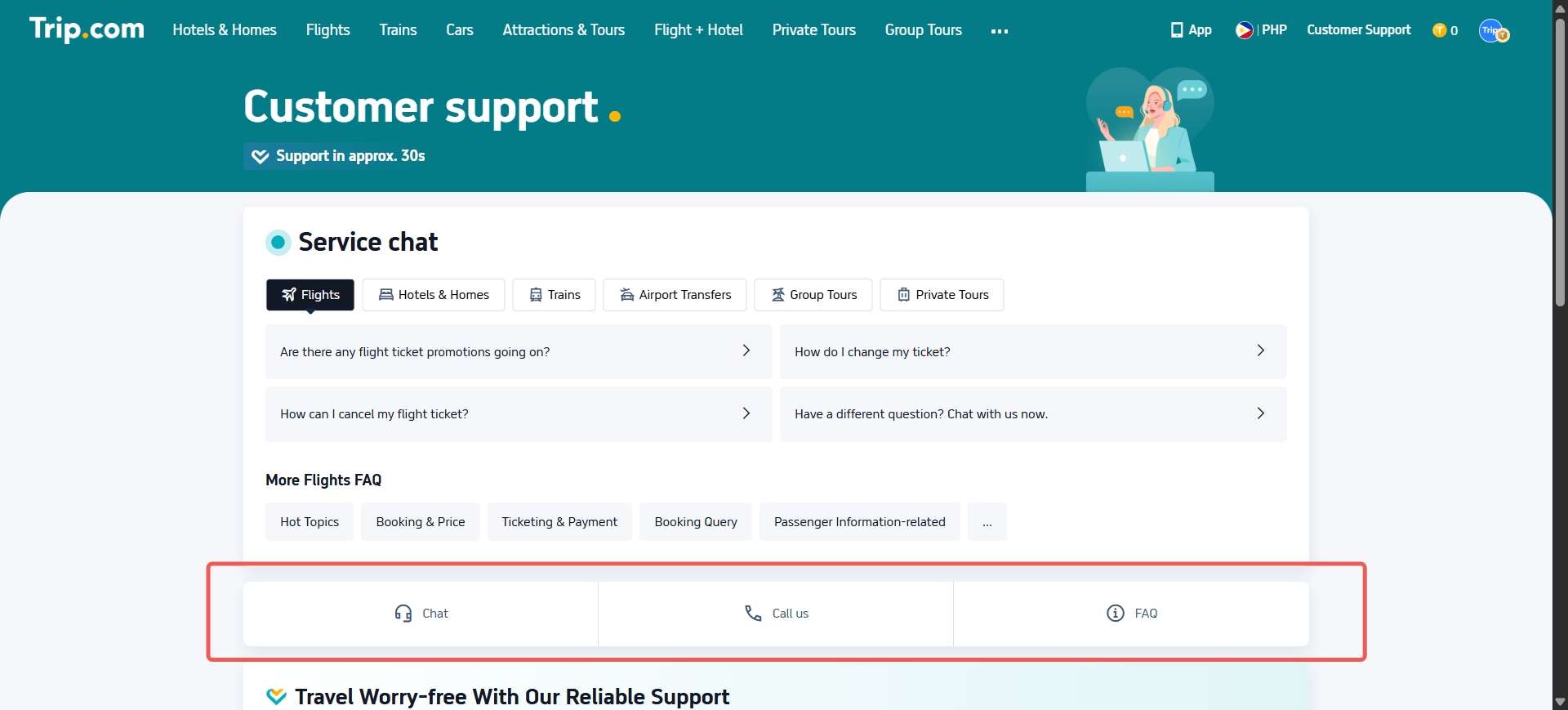
Trip.com support covers nearly every part of your travel booking and journey:
- Booking changes (dates, times, passenger details)
- Cancellations and refund inquiries
- Flight ticket issues (rescheduling, baggage allowance, check‑in help)
- Hotel check‑in, modification, or complaint support
- Train, car rental, and airport transfer queries
- Emergency help (lost baggage, travel delays, basic translation support)
- Account and payment issues
Tips for Faster Trip.com Customer Care
- Have your booking ID ready. Whether you're calling or chatting, providing your 10-digit booking number immediately speeds things up.
- Use the app when possible. Phone agents can see your account details instantly when you're logged in, and the VoIP call option is completely free.
- Check the FAQs first. For common questions like "How do I change my ticket?" or "What's your cancellation policy?" the Service Chat section often has instant answers that save you from waiting.
- Know your time zone. If you're calling about flights, hotels, trains, or cars, help is available 24/7. For attractions, tours, and other bookings, support runs from 6:30 AM to 11:30 PM New Delhi time.
[10% Off] Trip.com Hotel Promo Codes
Search Top Global Hotels
See All Hotels







FAQs about Trip.com Customer Care
-
Where can I find Trip.com customer care contact details for India?
-
Is there a free way to call Trip.com customer support?
-
How do I talk to a live agent on Trip.com’s chat support?
-
What services does Trip.com customer care provide?
Disclaimer: This article has been provided by an individual contributor or third party platform. If there is any discrepancy regarding the copyright, please contact us directly and we will delete the content immediately.
Trending Searches
-
Popular Airlines