
Trip.com Price Match Guide: Hotel Policy & How to Claim

By Bethy
June 29, 2026
Learn how Trip.com's hotel price match works, eligibility rules, how to submit a request, and whether flights qualify. Plus tips on price alerts, price graphs, and the cheapest times to book.
See all flights


What Is Trip.com Price Match & How Does It Work?
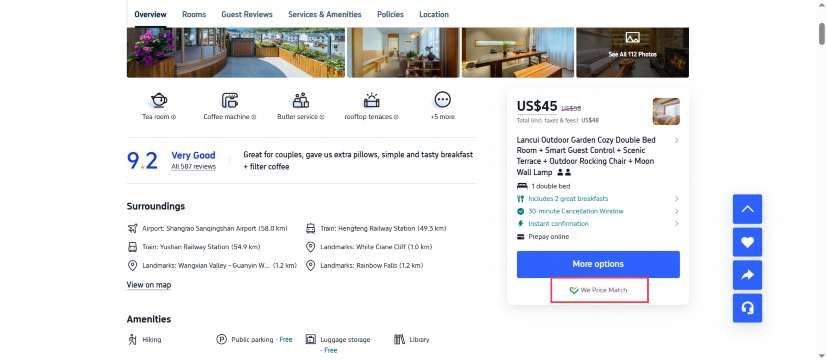
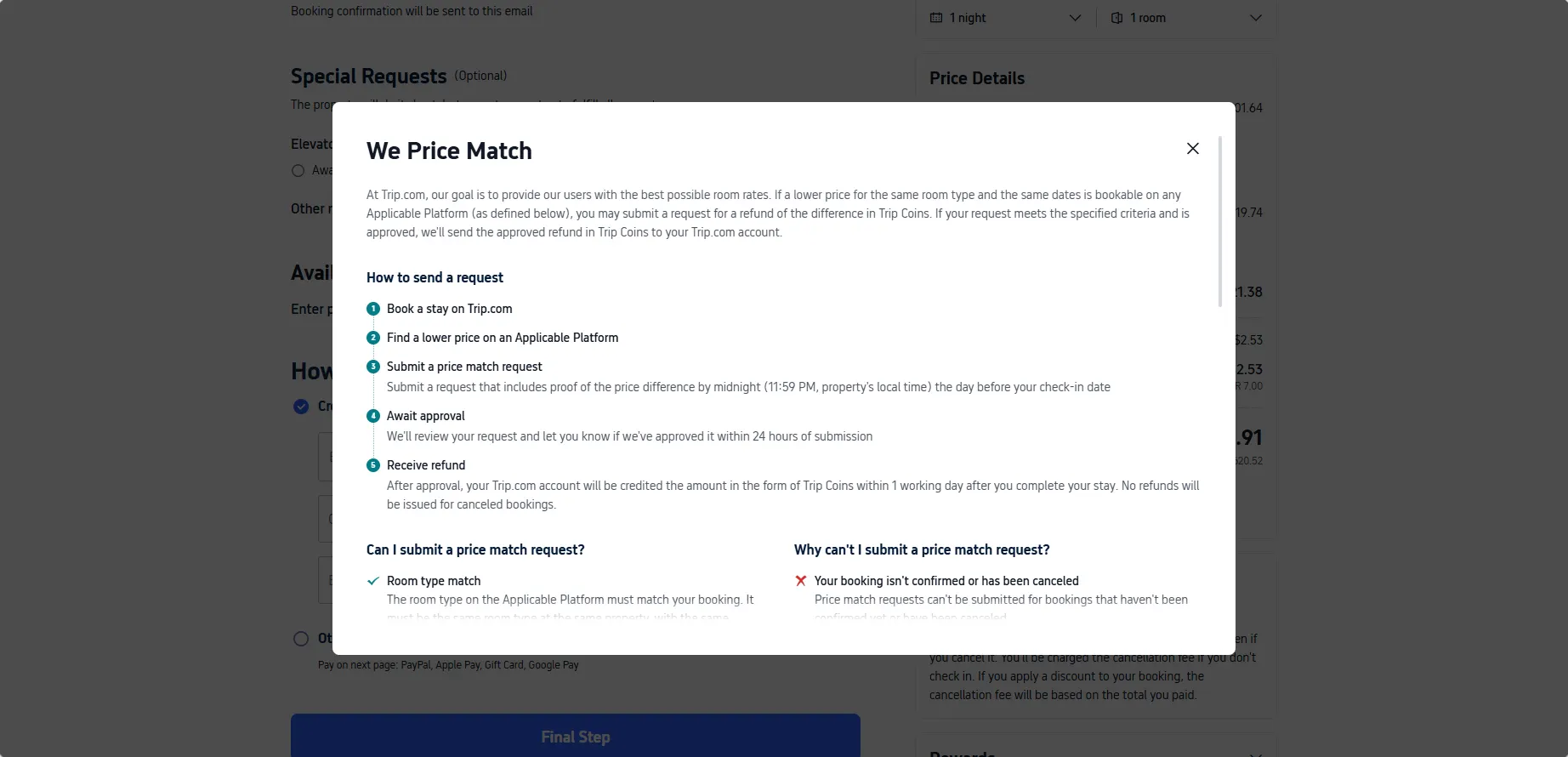
Hotel Price Match is the formal offering
Trip.com's Price Match program usually applies to hotels marked with the official "We Price Match" badge on their listing page. The core policy states: if you find a lower publicly bookable price for the exact same room type on the same stay dates on an Applicable Platform (check details on the Price Match Policies), you may submit a request for a refund of the price difference, paid out in Trip Coins.
The program is currently in trial phase and is only available in certain languages and regions. Terms are subject to change,check latest Trip.com Price Match policies.
Aspect | Hotel Price Match |
|---|---|
Official Policy | ✅ Yes — formal program |
Refund Method | Trip Coins only |
Max Refund | USD 1,500 per booking |
Submission Deadline | 11:59 PM day before check-in (local time) |
Approval Time | Within 24 hours of submission |
Flight pricing works differently
Unlike hotels, Trip.com does not operate a formal, universal price match program for flight bookings. There is no standardized submission process, no published set of eligibility criteria, and no guaranteed refund for fare differences found after booking. Travelers should not book flights on Trip.com with the expectation of receiving a price difference refund at a later date.
For securing competitive airfares, the official recommended approach is to use Trip.com's built-in Price Alert and price trend tools to monitor fares and book at your preferred price point. For post-ticketing fare-related questions, pricing rules are generally governed by the operating airline's tariff policies.
Disclaimer: This article is based on Trip.com's publicly available price match terms as of June 2026. Policies are subject to change. Always refer to the official Trip.com Price Match page for the most up-to-date terms and conditions. Price match availability may vary by region and language.
How to Submit a Hotel Price Match Request on Trip.com

The official submission process for hotel price match follows 5 steps:
- Book a stay on Trip.com — A confirmed hotel booking is required to submit a request.
- Find a lower price on an Applicable Platform — The lower rate must be publicly available and bookable by all users.
- Submit a price match request — Submit your request with proof of the price difference by midnight (11:59 PM, property's local time) the day before your check-in date.
- Await approval — Trip.com reviews the request and typically responds within 24 hours of submission.
- Receive refund — If approved, the price difference will be credited to your Trip.com account as Trip Coins within 1 working day after you complete your stay.
Important note: No refunds are issued for canceled bookings. If you cancel your hotel booking, any pending or approved price match request becomes void.
What Are the Eligibility Requirements for Hotel Price Match?
Your request must meet all requirements below to be considered:
Room type must match exactly
The room type on the Applicable Platform must be identical to your Trip.com booking, including:
- Same hotel property
- Same room type and room size
- Same in-room facilities
- Same breakfast policy (included or not included)
- Same cancellation policy
- Same number of guests
- Same payment method
- All other applicable booking details
Booking details must be fully consistent
- Stay dates must exactly match your Trip.com booking
- Payment method must be identical
- Language used at the time of booking must be the same
Price must meet public availability criteria
- The lower price must be available to all users — no member-only, restricted or promotional pricing
- Cannot be reduced by vouchers, promo codes, loyalty points, credit card promotions or any other discount method
- Must be bookable as a standalone hotel reservation — cannot be part of a package (tour packages, flight+hotel packages, etc.)
Why Might Your Hotel Price Match Request Be Rejected?
Common reasons for ineligibility include:
Booking status issues
- Your booking has not been confirmed yet
- Your booking has already been canceled
Booking type ineligibility
- Bookings for which you have received additional Trip Coins
- Bookings under the PointPLUS program
- Bookings made as part of a package (add-on packages, flight-and-hotel packages)
Platform not eligible
The lower price was found on a platform not listed as an Applicable Platform.
Other common rejection reasons
- Room type, dates or guest count do not match exactly
- The lower price uses a promo code, voucher or loyalty discount
- The lower price is part of a package deal
- You modified your booking after submitting the request (property name, room type, dates, guest count)
How Does Trip.com Compensate the Price Difference?
Refund is issued in Trip Coins, not cash
Approved price difference refunds are credited to your Trip.com account as Trip Coins, not as cash refunds to your original payment method. Trip Coins may be used for future bookings on Trip.com and are subject to the Trip.com Rewards Program Terms and Conditions.
Maximum refund limit
The maximum refundable price difference is USD 1,500 per booking. For bookings in other currencies, the equivalent amount is calculated using the exchange rate at the time of your request.
Timing
- Approval decision: within 24 hours of submission
- Trip Coins credited: within 1 working day after you complete your stay
Currency for price comparison
- Online payment: prices are compared in the currency used at time of booking
- Pay at property: prices are compared in the property's local currency
If you applied promo codes to your Trip.com booking, the discounted price (including tax) will be used as the baseline for price comparison.
Important Rules & Limitations for Hotel Price Match
- One refund per booking: Only one refund will be issued per booking. If multiple requests are approved, you will receive the refund for the largest price difference.
- Request frequency limits: Trip.com reserves the right to limit or reject requests if they appear excessive.
- Verification price prevails: If there is a discrepancy between the price you found and the price Trip.com verifies, the price at the time of verification applies.
- Booking modifications invalidate requests: Any post-submission modification to property name, room type, stay dates or guest count will render the request invalid.
- Fraud and abuse: Trip.com reserves the right to restrict requests or deny refunds in cases of illegal, fraudulent, abusive or otherwise improper use.
- Trial phase: Price match is currently in trial phase and only available in certain languages and regions.
- Sole discretion: Trip.com reserves the right, at its sole discretion, to determine whether a booking qualifies for price match.
- Language precedence: In the event of inconsistency between the original English terms and translated versions, the English version shall prevail.
See all attractions
 2735 booked






Does Trip.com Offer Price Match for Flights?
There is no formal, published price match program for flight bookings on Trip.com equivalent to the hotel price match policy. No standardized submission form, no fixed eligibility rules and no guaranteed refund of fare differences exist for airfare bookings.
In practice, this means you cannot rely on post-booking price adjustments for flights. If you find a lower fare for the same flight elsewhere after booking, there is no official mechanism in place to guarantee you a refund of the difference.
For the best chance of securing a low fare, the recommended approach is to use Trip.com's Price Alert tool and price trend graph to monitor fare movements ahead of booking, and to confirm your reservation when the price meets your budget. For any questions about fare rules or ticket adjustments after booking, pricing policies are set and administered by the operating airline.
How to Use Trip.com Price Graph & Price Alerts to Save Money
Price Trend Graph for flights
Trip.com's flight search page includes a Price Trend Graph that displays fare fluctuations over time, typically covering 7-day, 14-day or 30-day windows for your selected route.
- If the trend shows a steady gradual decline, you may choose to wait and continue monitoring
- If the trend shows consistent upward movement, booking earlier may be preferable
- Look for price drop labels indicating fares below the recent average
Note: Dedicated price trend graphs are primarily a flight feature. Hotel price comparisons across dates are available via flexible date search and low-price calendar views.
Price Alerts for flights
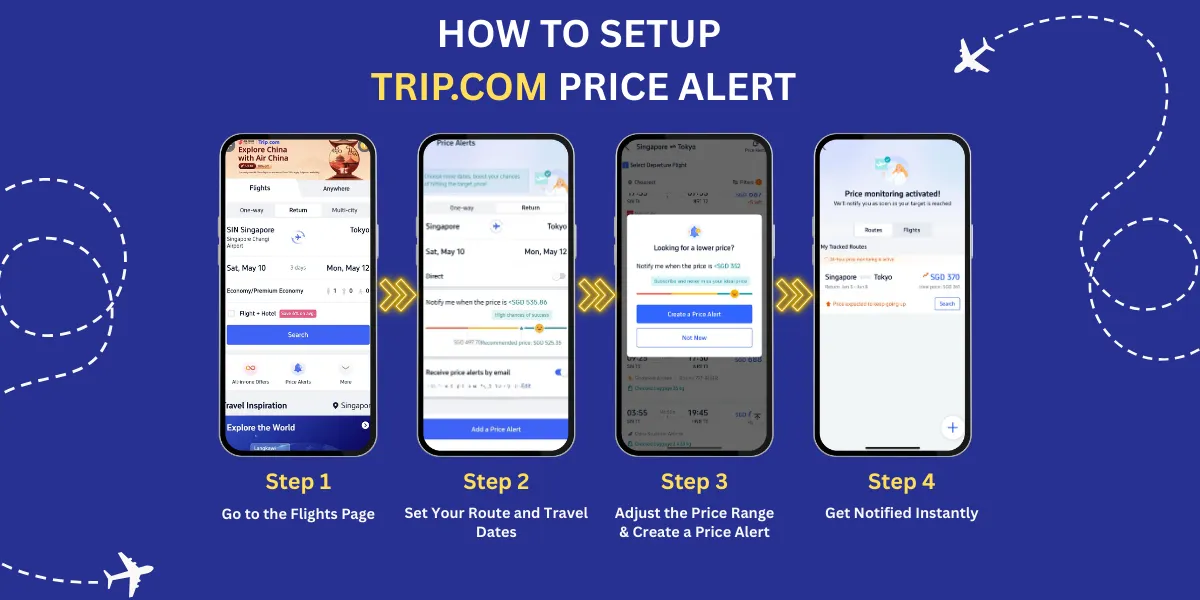
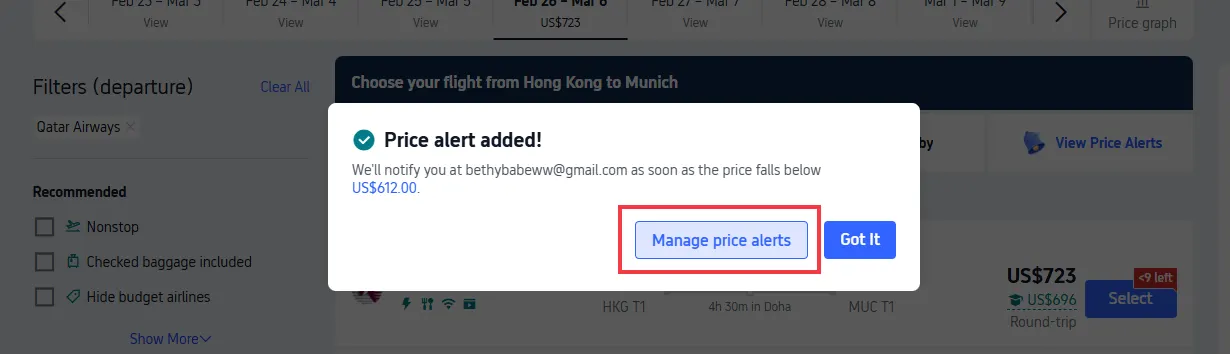
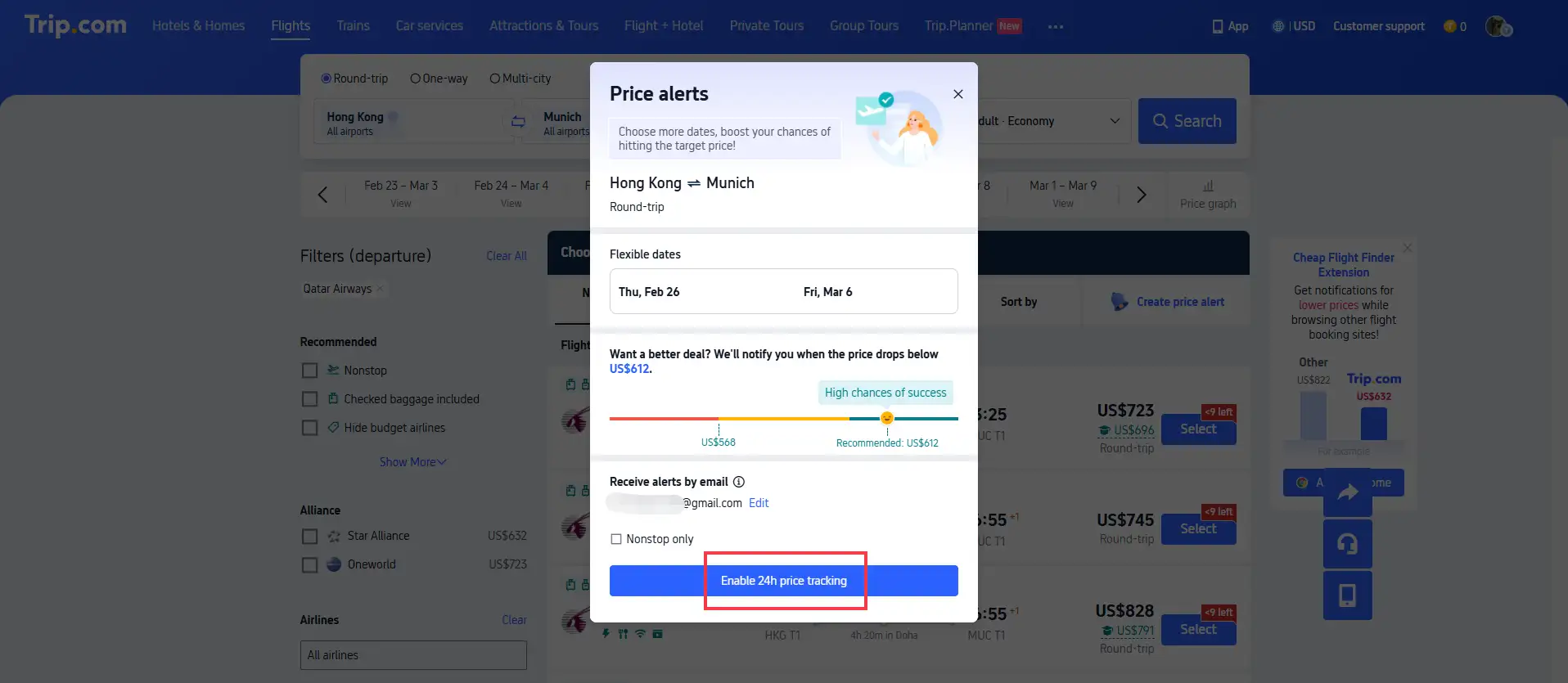
Trip.com Price Alert is a free tool that automatically tracks flight fares for your chosen routes, dates and cabin class, and notifies you when prices move into your target range.
How to set up Price Alerts:
- Go to the Flights section on the Trip.com app or website
- Locate the Price Alert option below the search bar
- Enter your departure, destination, dates, travel type and cabin class
- Set your target price range using the interactive slider
- Select your preferred notification method (app push and/or email)
- Confirm to activate the alert
Flexible Dates search
For both flights and hotels, the Flexible Dates feature shows a calendar view of prices across nearby dates. Shifting your trip by 1–2 days can often result in noticeable savings.
What Time Is Trip.com the Cheapest?
Pricing on Trip.com is dynamic and driven by supply and demand — there is no guaranteed cheapest time to book. The following general patterns are commonly observed across travel markets:
Cheapest days of the week to book
- Tuesdays and Wednesdays typically see more frequent fare and rate adjustments, often with lower pricing
- Mondays and Fridays tend to have higher pricing aligned with business travel demand
Cheapest times of day
- Early morning (6 AM – 8 AM local time) often reflects overnight inventory updates and may present lower available fares
- Late night (midnight – 2 AM local time) can see last-minute inventory releases for unsold seats and rooms
Recommended booking windows
Booking Type | General Recommended Advance Booking |
|---|---|
Long-haul international flights | 3–6 months in advance |
Short-haul / regional flights | 1–2 months in advance |
Domestic flights | 1–3 months in advance |
Peak season / holiday travel | Book earlier; prices rise faster as dates approach |
Cheapest travel periods
- Shoulder season (between peak and off-peak) typically offers the best balance of price and conditions
- Off-peak months vary by destination but often include February, June and November in many markets
- Weekday travel (Monday–Thursday) is generally cheaper than weekend travel for both flights and hotels
These are general observations, not guarantees. Prices fluctuate constantly based on demand, inventory and competitor pricing. Using Price Alerts and flexible date search is the most reliable way to find favorable pricing for your specific trip.
[Discount] Trip.com Hotel Promo Codes
Search Top Global Hotels
See All Hotels







FAQs about Trip.com Price Match
-
Can I get a cash refund for price match?
-
What if I modify my booking after submitting a price match request?
-
Does the price match apply to flight+hotel packages?
-
What's the maximum I can get back from hotel price match?
Disclaimer: This article has been provided by an individual contributor or third party platform. If there is any discrepancy regarding the copyright, please contact us directly and we will delete the content immediately.
Most popular content
-
Popular Airlines