How to Change Booking on Trip.com - Rules & Fees

By Bethy
May 18, 2026

Here is your complete guide to managing, changing, and rebooking your Trip.com itineraries without the headache!
See all flights


Can You Change Bookings on Trip.com?
Yes, you can absolutely modify your reservations on Trip.com! However, because Trip.com operates as an online travel agency, the ability to change your booking ultimately depends on the specific policies of the airline, hotel, train operator, or rental company you booked with. While the platform provides the tools to process these changes, the flexibility, deadlines, and associated costs are tied to the third-party providers.
Booking Type | Can You Change It? | Key Details to Remember |
Flights ✈️ | Yes, in most cases | Subject to the airline's rules and fare class. You will usually have to pay a change fee plus any fare difference. Low-cost carriers may require you to process changes directly on their official websites. |
Hotels 🏨 | Yes, but canceling/rebooking is preferred | Modifications like shifting dates directly aren't always possible. The best route is to book "Free Cancellation" rooms, cancel the original booking without penalty, and simply book again for your new dates. Non-refundable rooms cannot be altered. |
Trains 🚆 | Yes, but with strict timelines | Rules are set by the railway operators. Most changes are only permitted before departure. Some operators allow date/time swaps, while others forbid changes entirely. |
How to Change & Rebook Flights on Trip.com
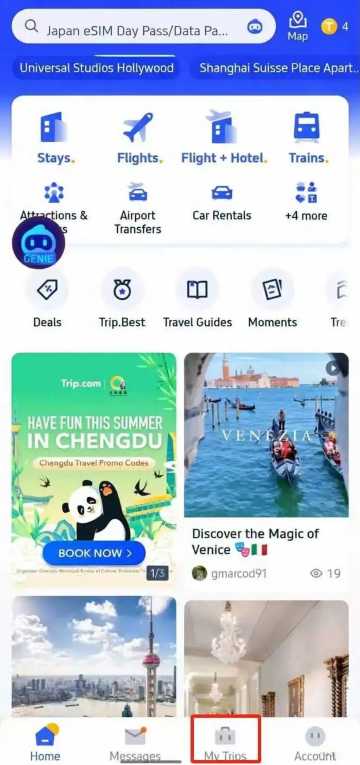
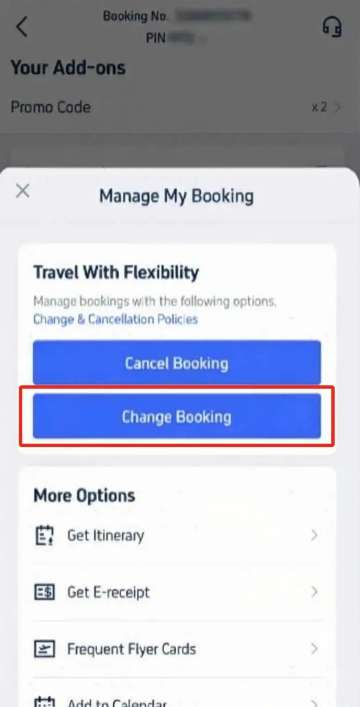
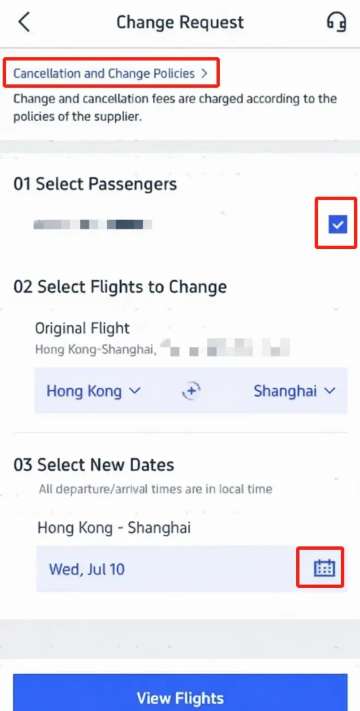
Changing a flight is usually the most daunting part of altering a trip, but the Trip.com app makes the process relatively smooth.
- Access your itinerary: Open the Trip.com app, sign in, and tap on the "My Trips" tab at the bottom to find your upcoming journeys.
- Manage the booking: Tap on the specific flight you need to change, then select "Manage My Booking." (Pro tip: Check the “Cancellation & Change Policies” here first to see what you’re up against).
- Submit a change request: Click "Change Booking." You’ll be prompted to select which passengers are altering their plans, confirm your original route, and use the calendar icon to pick your new travel dates.
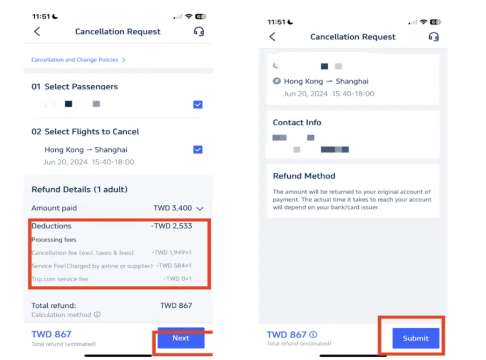
- Pick a new flight: Browse the available options. Keep in mind that you generally have to stick with the same airline or their direct partners. Select your new flight and preferred cabin class.
- Confirm and pay: Review the price breakdown. If the new flight costs more, you’ll need to pay the fare difference. Once you hit "Confirm" and process the payment, keep an eye on your inbox for your new e-tickets!
How to Change Hotel Bookings on Trip.com
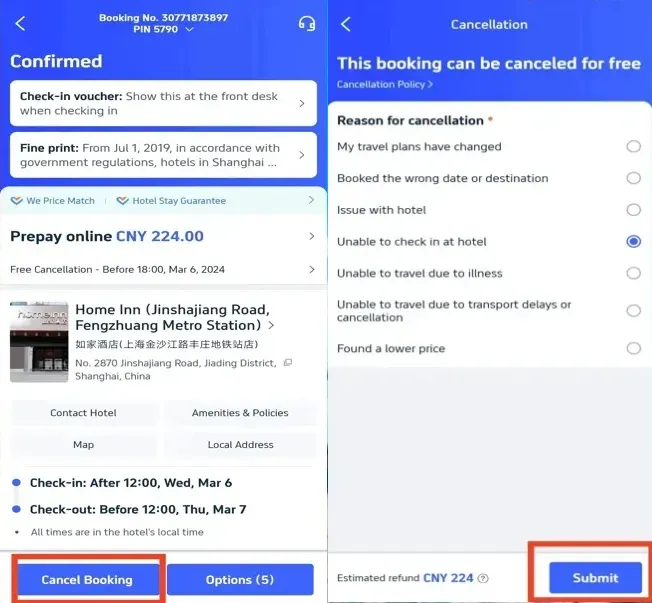
Instead of navigating a clunky modification menu, Trip.com recommends a much simpler "Cancel and Rebook" method for hotels.
- Locate your reservation: Head to "My Trips" or your account's "All Bookings" section and select your hotel stay.
- Cancel the original stay: Tap "Cancel Booking." The app will display the hotel’s cancellation policy. Select your reason for canceling and hit "Submit."
- Wait for the refund: You can track the status under "Refund Status." Usually, it takes about one business day for funds to return to your account (provided you were within the free cancellation window).
- Rebook: Search for your new dates or destination on Trip.com and lock in a fresh reservation.
How to Change Train Bookings on Trip.com
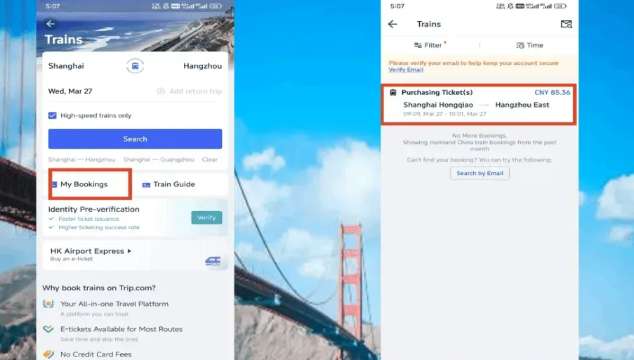
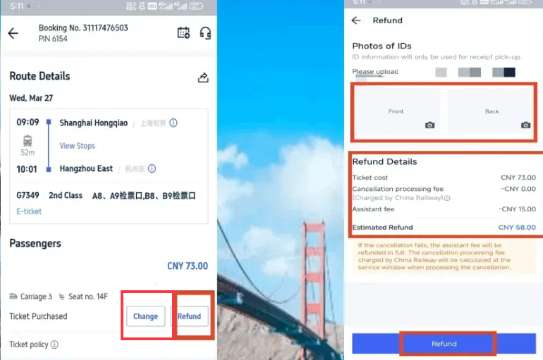
Train ticket modifications depend heavily on whether you’ve already picked up a physical ticket and how close you are to your departure time.
- If you haven't collected your ticket AND you are more than 35 minutes from departure: Go to "My Trips" and select "Train Orders." Find your journey and tap "Change" (or just "Refund" if you prefer to cancel and start over). Follow the prompts to select a new train time and secure a new e-ticket.
- If you have a physical ticket OR it’s less than 35 minutes to departure:
Online modifications are no longer an option. You must go to the nearest physical railway station. Head to the ticket change window with your original physical ticket and the exact ID (like your passport) you used to make the booking so the staff can manually swap your train.
How to Avoid Trip.com Booking Change Fees
Nobody likes paying extra just to tweak their schedule. Here is how to protect your wallet:
- Filter for Flexibility: Always prioritize flexible options when booking. Look for the "Free Cancellation" tag on hotels. For flights, opt for "flexible flight tickets" or purchase the "Air Flexibility" add-on at checkout, which allows date changes without hefty airline penalties.
- Act Fast: The closer you get to your departure or check-in, the more expensive changes become. Altering a booking weeks in advance is often much cheaper than making a last-minute swap 24 hours before you travel.
- Keep an Eye on Promos: Trip.com occasionally runs promotions that waive change fees. Check the "Deals" tab or sign up for email notifications to catch these perks.
How Much Do the Fees Typically Cost?

If you don't have a flexible booking, here is a general idea of what you can expect to pay:
- Flights: Airline penalty fees usually range anywhere from $30 to over $200, depending on whether you're flying a budget carrier or a premium airline (and whether you are in Economy or Business class). Plus, you must always pay the fare difference if the new ticket is more expensive.
- Hotels: If you booked a flexible hotel and change within ddl, the fee is $0. If you booked a strict, non-refundable rate, modifications are generally not allowed, meaning you forfeit the full cost of the room.
- Trains: Fees are usually a percentage of your fare based on timing. For example, changing more than 15 days out might be free, while changing 24 to 48 hours before departure might cost a 10% fee. Changing with less than 24 hours' notice could cost 20%.
- Trip.com Service Fee: Trip.com may charge a minor processing fee (usually between $5 and $20) if the provider doesn't process the change directly. This is always disclosed on the final confirmation page.
How to Find Booking Change Customer Support

Sometimes an app just doesn’t cut it, and you need to talk to a real human. If you're struggling with a complex itinerary change or a glitch, Trip.com has robust customer service options. To find support, log into the app or website and navigate to the Customer Support / Help Center. From there, you can access:
- 24/7 Live Chat: The quickest way to get an agent to look at your booking.
- Online In-App Calling: A great option to avoid international roaming charges if you are already abroad.
- Global Call Center Numbers: Dedicated phone lines categorized by country/region if you prefer dialing directly.
You can also usually find a direct "Contact Support" button right at the bottom of your specific booking page in the "My Trips" portal! Note: Only reach out to support for rule-compliant flexible booking issues and unresolved platform bugs. Airline add-ons and policy-limited changes are beyond customer service scope.
See all attractions
 2548 booked






[10% Off] Trip.com Hotel Promo Codes
Search Top Global Hotels
See All Hotels







FAQs about Trip.com change booking
-
Can I change the passenger name on my Trip.com flight booking?
-
What happens if the new flight I want is cheaper than my original one?
-
Can I change my booking after I have already checked in online?
-
What happens if a hotel refuses to change my dates?
Disclaimer: This article has been provided by an individual contributor or third party platform. If there is any discrepancy regarding the copyright, please contact us directly and we will delete the content immediately.