Trip.com Refund Guide: How to Cancel Flights, Hotels & Trains

By Bethy
May 13, 2026
Learn how to request a refund on Trip.com. Detailed steps for canceling flight, hotel, and train bookings, checking status, and policy rules.
See all flights


How to Get Trip.com Hotel Refunds?
Hotel refunds are primarily governed by the specific room rate you chose during booking.
Trip.com Hotel Refund Rules
- Free Cancellation: If you booked a "Free Cancellation" room, you can get a full refund as long as you cancel before the hotel's specified deadline (usually 24–48 hours before check-in).
- Non-refundable: These are usually cheaper but do not allow for refunds unless there are extreme extenuating circumstances (which Trip.com may mediate).
How to Get Trip.com Hotel Refund
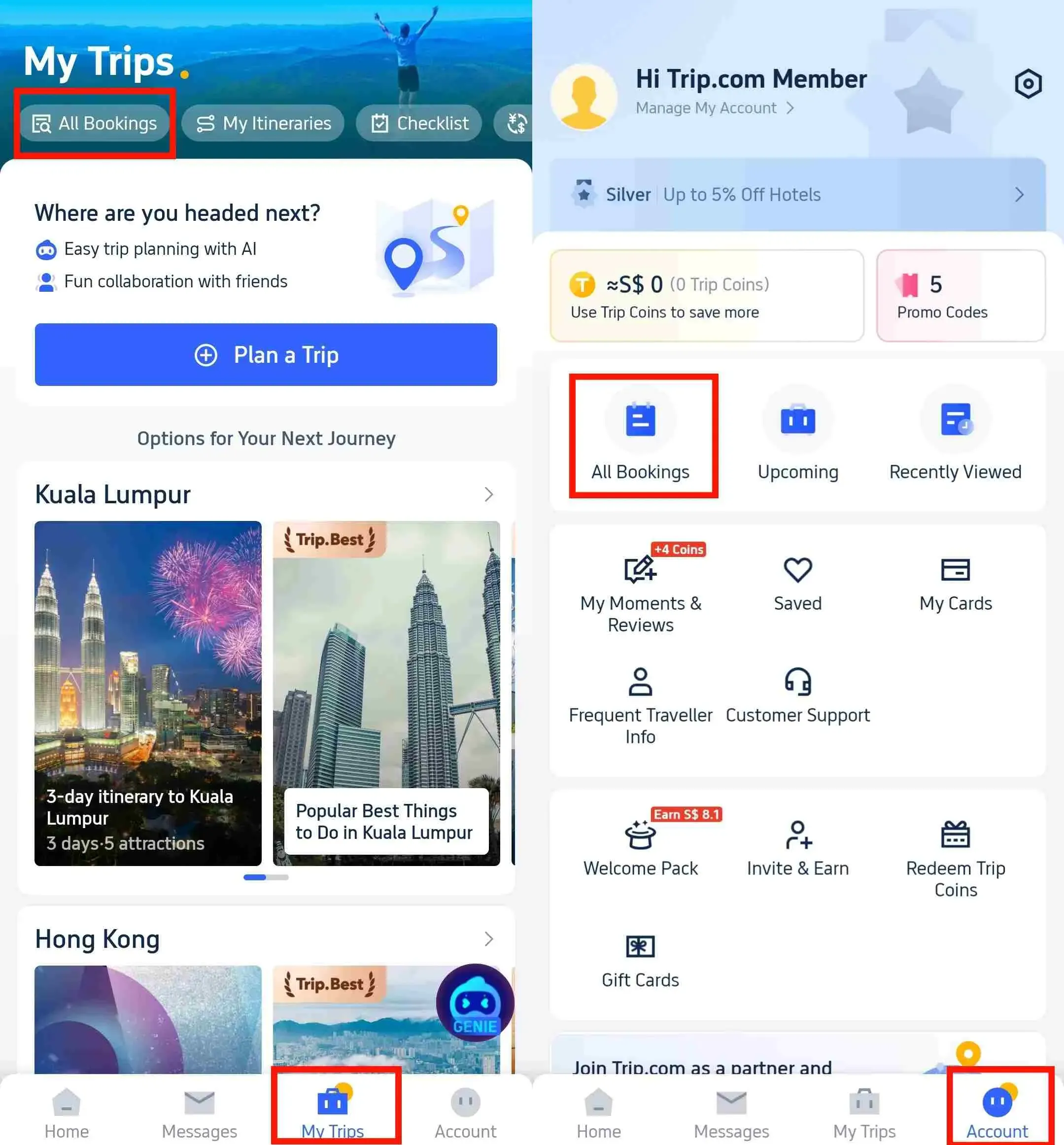
- Log in and go to "Account".
- Tap/Click on "All Bookings".
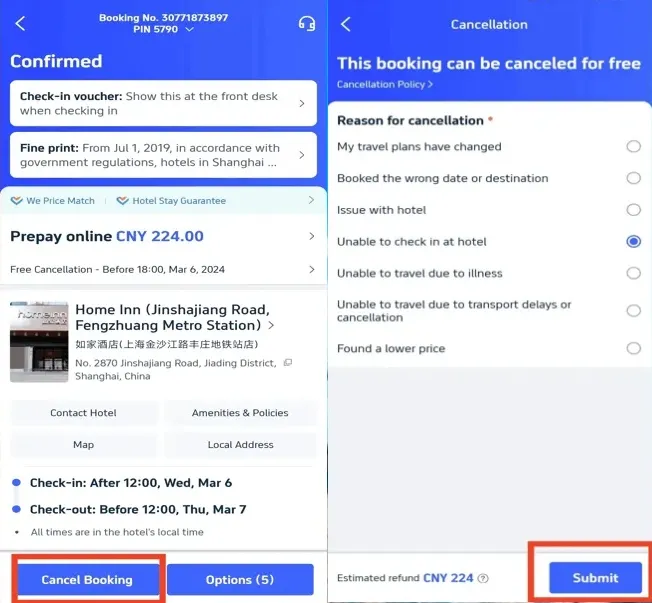
- Select the specific hotel booking you wish to cancel.
- Look for the "Cancel Booking" button at the bottom of the page.
- Review the "Cancellation Fee" (it should be $0 if within the window).
- Click "Confirm Cancellation".
[10% OFF] Best Hotel Recommendations
Find Best Global Hotels
See All Hotels
 NO.1
NO.1






How to Get Trip.com Flight Refunds? Airline vs. Agency
Flight refunds are the most complex because Trip.com must adhere to the specific "Fare Rules" set by the airline.
*Disclaimer: All refunds are subject to the specific provider's terms and final approval; Trip.com acts as an intermediary and cannot guarantee a full refund for non-refundable bookings or for fluctuations in bank processing times.
Trip.com Flight Refund Rules
- Refundable Tickets: You will receive the fare back minus an "Airline Cancellation Fee" and potentially a small Trip.com processing fee.
- Non-refundable Tickets: Usually, only the unused government taxes are refundable.
- Involuntary Refunds: If the airline cancels your flight, you are generally entitled to a full refund regardless of your ticket type.
How to Get Trip.com Flight Refund
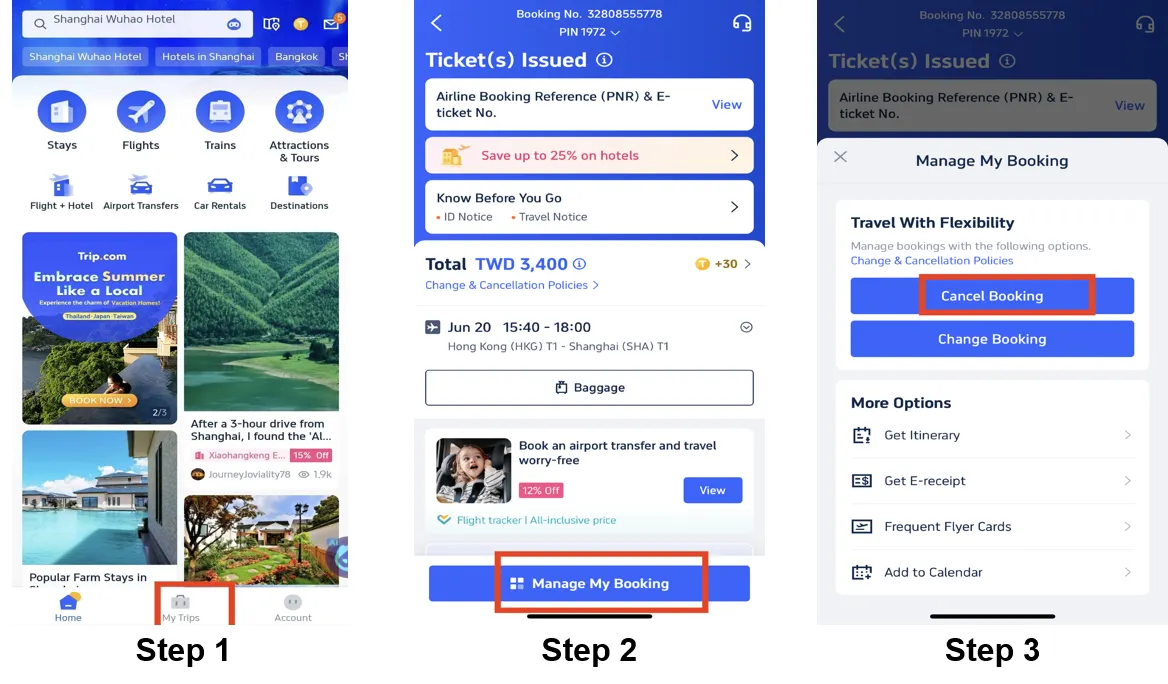
- Navigate to "My Bookings".
- Select the flight itinerary.
- Click on the "Cancel/Refund" button.
- Select the "Refund Reason" (e.g., "Personal Reasons," "Flight Schedule Change").
- Review the estimated "Refund Amount".
- Click "Submit".
Note: For multi-passenger bookings, you can often choose to refund the entire party or just specific passengers.
How to Get Trip.com Train Refunds?
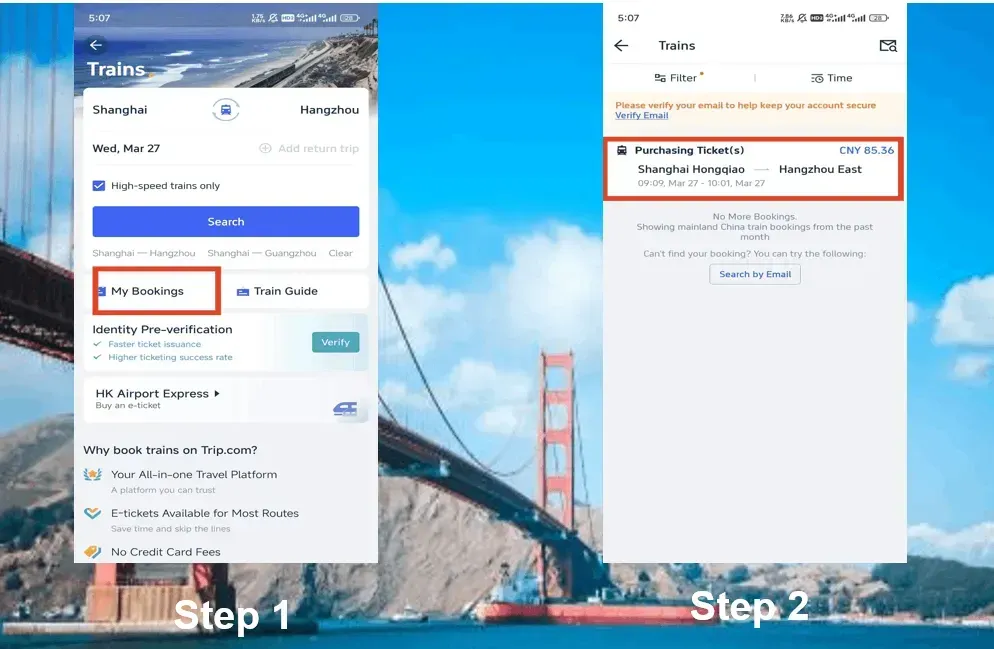
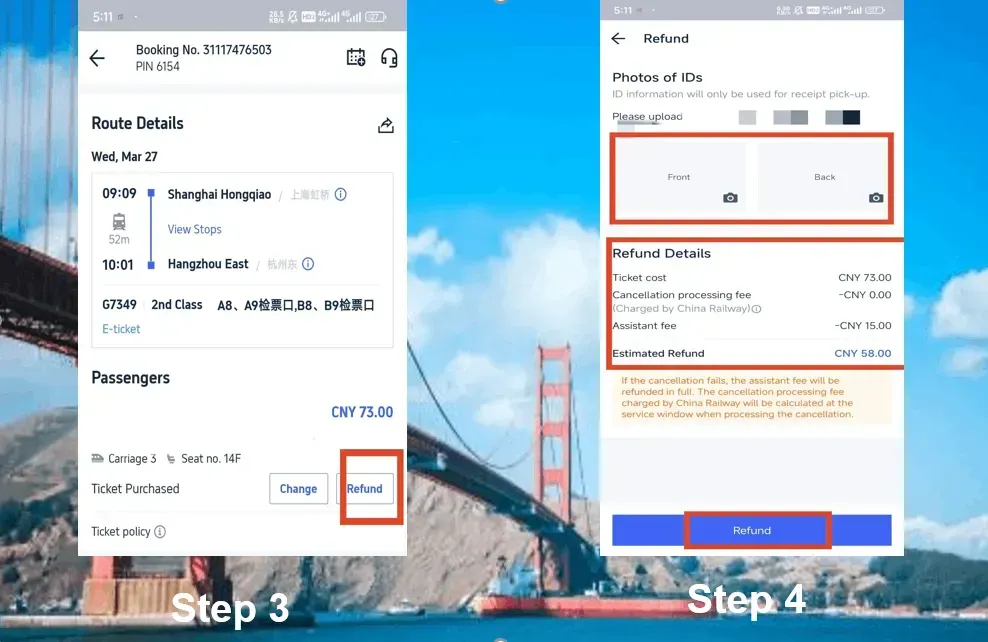
Train ticket rules vary significantly by country (e.g., China Rail vs. UK Rail), but the "Rule of Thumb" is that the closer you are to departure, the higher the fee.
Trip.com Train Refund Rules
- Before Departure: Most tickets can be refunded online up to 30–60 minutes before the train leaves.
- After Departure: Online refunds are typically not possible; you may need to visit a physical station ticket window (standard for China Rail).
How to Get Trip.com Train Refund
- Go to "My Bookings" and select your train ticket.
- Click the "Refund" button.
- Confirm the selection of passengers.
- Click "Confirm Refund".
- Check for the "Refund Processing" notification.
How to Check Your Trip.com Refund Status
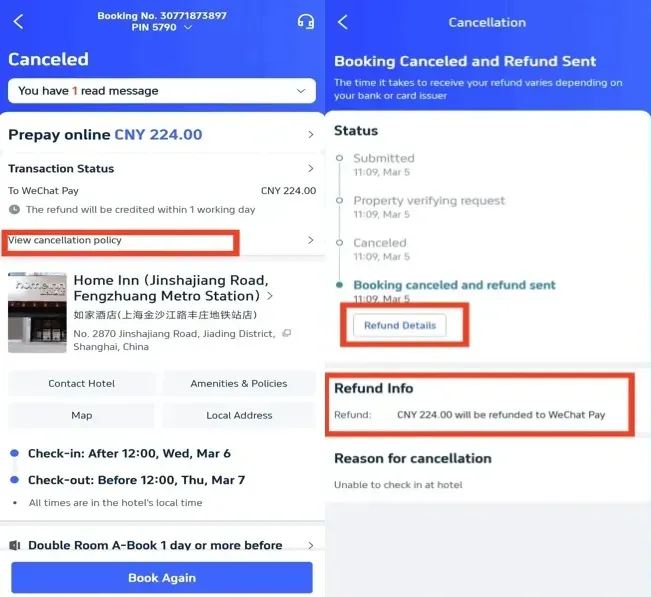
Once you've hit that button, the waiting game begins. Here is how to keep tabs on your money:
- Open the Trip.com app or website.
- Go to "Account" > "All Bookings".
- Select the booking you canceled.
- Tap "Refund Details" or "View Progress".
- You will see a timeline: Refund Requested → Processing → Refund Sent → Completed.
See all attractions







Trip.com Refund Timelines & Methods
- Method: Refunds are always sent back to the original payment method (Credit Card, PayPal, Apple Pay, etc.).
- Timeline: While Trip.com usually processes the request within 24 hours, it can take 7 to 30 business days for your bank to reflect the balance in your account.
How to Contact Customer Support
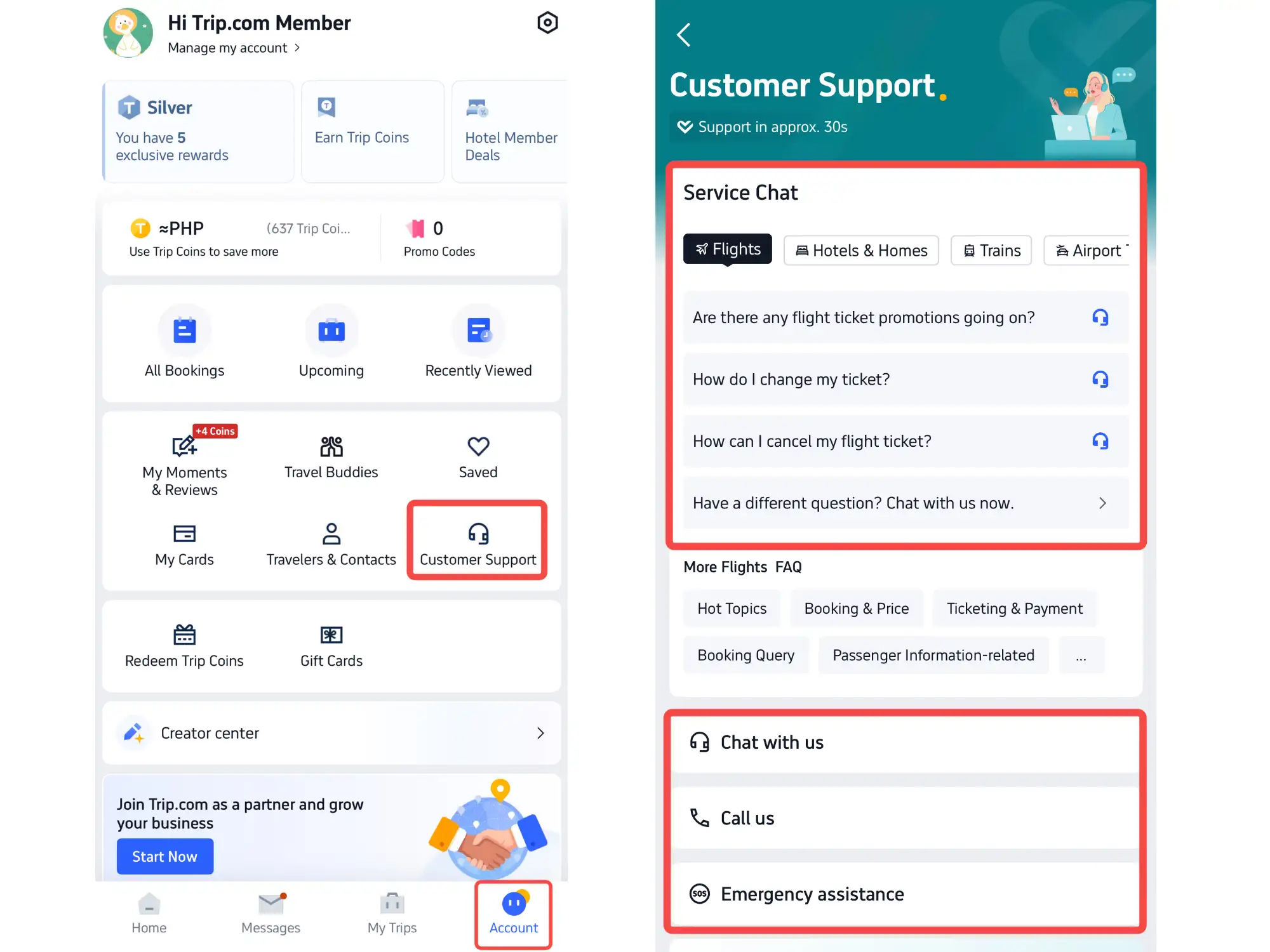
If the automated buttons aren't appearing or you have a complex case:
- Live Chat: Available 24/7 in the app via "Account" > "Help Center" > "Chat with Us".
- Phone Support: Regional numbers like India number are listed in the "Contact Us" section for immediate assistance.
FAQs about Trip.com Refund
-
How long does Trip.com refund actually take?
-
Can I get a refund if I just missed my flight?
-
Why is my refund amount different from what I paid?
-
I haven't received my refund, but the status says "Completed." What do I do?
-
Can I cancel one person out of a group booking?
Disclaimer: This article has been provided by an individual contributor or third party platform. If there is any discrepancy regarding the copyright, please contact us directly and we will delete the content immediately.
Trending
-
Popular Airlines