How to Enter Passenger Name on Flight Ticket: Formats & Rules

By Bethy
October 15, 2026

Learn the official rules for entering passenger names on flight and train bookings. Includes single-name handling, FNU meaning, airline-specific policies, and tips to avoid check-in issues.
See all flights


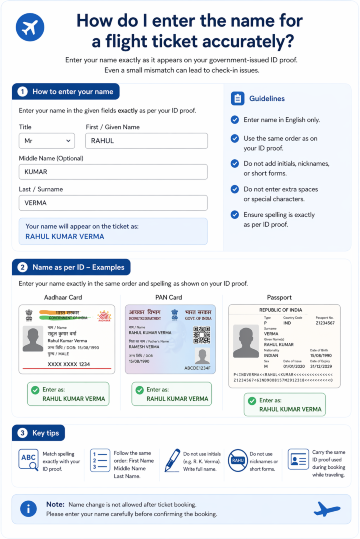
How do I enter the name for a flight ticket accurately?
**Flight Name Entry**
The ultimate rule of flight booking is simple: The name on your ticket must match your official government ID or passport character for character. Do not use nicknames, abbreviations, or titles (like Dr. or Prof.) inside the name fields.
Furthermore, airline booking engines rely on legacy data systems that do not recognize special characters. When typing your name, you must strip out punctuation:
- Hyphens:
Sarah Jean-Pierrebecomes SARAH JEANPIERRE - Apostrophes:
O'Connorbecomes OCONNOR
Crucial Example for India: For Indian domestic travel, your ticket must match your Aadhaar card, Voter ID, or PAN card exactly. If you are flying internationally, it must mirror your Indian passport. If your passport includes your father's or spouse's name as part of your structural given name section, you must include it exactly as printed.
How to Fill First Name and Last Name for International Flight Booking?

For international flights, your booking name must match your passport 100% — no abbreviations, no translations, no rearrangements. The safest reference is the Machine Readable Zone (MRZ) — the two lines of text at the bottom of your passport photo page — as this is what immigration and airline systems scan.
Name Type | Real-World Example | First Name Field | Last Name Field |
Standard Name | Emma Watson | EMMA | WATSON |
With Middle Name | James Earl Jones | JAMESEARL (or use Middle field) | JONES |
Double Last Name | Lucas Taylor-Smith | LUCAS | TAYLORSMITH |
Step-by-step for international name entry
- Locate the “Given Names” and “Surname” fields on your passport bio page.
- Enter all text from the “Given Names” section into the First Name field of the booking form.
- Enter all text from the “Surname” section into the Last Name field.
- Use only Latin (English) alphabet characters, in all uppercase.
- Remove any hyphens, apostrophes, or spaces if the system does not accept them.
Example:
- Passport name: Ahmad Rafiq Al-Muhajir
- First Name: AHMAD RAFIQ
- Last Name: ALMUHAJIR (hyphen removed)
Crucial Example for India: Naming structures in India vary heavily by region. A passenger from South India named Koppula Siva Naga Venkata Mani Kumar might find their passport lists "Koppula" as the Surname and the rest under Given Names. On the flight booking page, you would enter KOPPULASIVANAGAVENKATAMANIKUMAR into the First Name box if the field characters permit, or truncate strictly according to the airline's long-name policy.
What is FNU (First Name Unknown) in flight bookings?
FNU stands for First Name Unknown. It is a standard industry placeholder used in airline reservation systems when a passenger has only one legal name (no separate given name and family name) and the booking system requires both a first name and last name field to be completed.
FNU is not an error or a special status — it is a recognized code used by airlines and immigration authorities worldwide to indicate that the passenger’s full legal name is listed in the last name field.
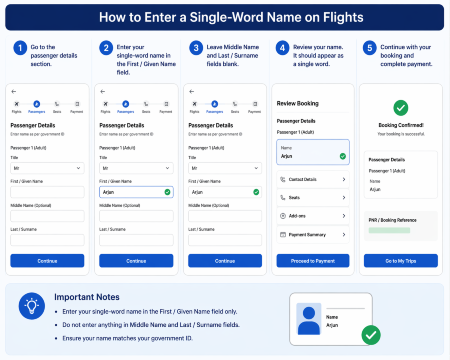
How to enter a single-word name on flights
**Single-Name fly**
If you have only one name on your passport/ID, use one of the following two widely accepted formats:
- Option 1 (General use): Enter your full name in both fields.
- First Name: SLAMET
- Last Name: SLAMET
- Option 2 (Required by some airlines): Use FNU in the first name field.
- First Name: FNU
- Last Name: SLAMET
Only use FNU when the system will not accept a blank first name field. For most bookings, Option 1 is simpler and accepted by the majority of carriers.
India-specific note: While most Indian citizens have both given and family names, some travelers from regional communities may have a single legal name on their passport or ID. For flights operated by Indian carriers, the duplicate-name format (same name in both fields) is widely accepted. For long-haul routes to the U.S., Canada, or Europe, confirm with your airline — some immigration systems prefer the FNU format for single-name passengers.
How Do Airlines Handle Long Names or Names With Punctuation?
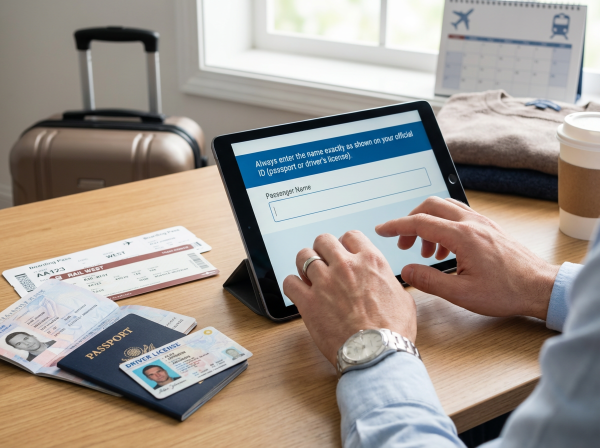
Airline booking systems have character limits for name fields. Standard limits are approximately 25 characters for first/middle names and 30–40 characters for last names, though exact limits vary by carrier.
Long name rules
If your full name exceeds the character limit:
- Prioritize entering your first/given name in full.
- Truncate the last name from the end, keeping as many characters as possible.
- Always follow the specific truncation policy of the airline you are flying with.
Punctuation and special characters
All punctuation must be removed entirely. This includes:
- Hyphens (e.g., Al-Muhajir → ALMUHAJIR)
- Apostrophes (e.g., O’Brien → OBRIEN)
- Periods, commas, slashes, and accent marks
Accented characters should be replaced with their standard Latin equivalent (e.g., é → e, ñ → n).
India-specific note: Indian names that include honorifics, regional suffixes, or compound surnames with hyphens or spaces should have all special characters removed and be written as a continuous string. For example, “Priya Anandhi Venkataraman-Chandrasekar” would be truncated from the end of the last name if it exceeds the character limit, with the first name kept intact. Always retain as much of your surname as the system allows to match your passport.
See all attractions
 2609 booked






What Are the Name Entry Rules for Major Airlines?

While global standards apply, individual airlines may have specific requirements for single-name passengers and name formatting. Below are official and widely followed policies from top carriers:
Singapore Airlines
If your passport does not separate given and family names, select the “I do not have a first/given name” option during booking, then enter your full legal name in the Last/Family name field. Leave the first name field blank.
AirAsia
Enter your single legal name in the Last Name field. For the mandatory First Name field, use a title (MR, MS) or placeholder such as NA. Do not enter the same name in both fields, as the system may interpret it as a two-word name.
Qatar Airways
Enter your full legal name as your last/family name. For a single-word name, enter it as your surname in the booking, followed by “/FNU” and a title. Always contact customer service for travel to the U.S. or Canada, where surname validation is stricter.
IndiGo (India)
For all IndiGo domestic and international flights, enter your name exactly as printed on your government-issued ID. Single-name passengers may duplicate their name in both first and last name fields, or use FNU if the system requires it. Name changes after booking are subject to fees and airline approval.
India-specific note: For most domestic flights within India, carriers like IndiGo, SpiceJet, and Air India follow standard ID-matching rules and are generally lenient with minor formatting differences as long as the spelling matches. For international segments, however, rules align with global IATA standards, so strict passport matching is required.
How to Enter Passenger Names for Train Bookings?

Rail operators have significantly more flexible name requirements than airlines, as identity verification typically prioritizes ID number matching over exact name formatting.
Key rules for train bookings:
- Most systems use a single “Passenger Name” field — enter your full name as shown on your ID.
- Separate first and last name fields are uncommon; if they appear, you may use a placeholder (dash, period, or NA) for the first name if you have a single name.
- Capitalization is optional but recommended for readability.
- Punctuation should still be omitted.
India-specific note: For Indian Railways and private train services, enter your full name as it appears on your Aadhaar card, voter ID, or passport. Name spelling must match, but formatting (capitalization, spacing) is not strictly enforced. As long as your ID number and name spelling correspond, single-word names pose no issue.
Common Name Entry Mistakes and How to Fix Them
Even small errors can cause big problems at the airport. Here are the most frequent mistakes and how to resolve them:
- Swapped first and last names
This is the most serious error. If you notice the swap after booking, contact the airline or booking platform immediately to request a correction. Many airlines allow one free name correction for obvious order errors, but this is not guaranteed. - Minor spelling typos
A one-letter typo may pass check-in on domestic routes, but it is risky for international travel. Always correct spelling errors before departure — some airlines charge fees for corrections, while others require rebooking. - System error: “Last name required”
If you get an error message saying a field is required, try entering a period (.), NA, or a title (MR/MS) in the mandatory field. Never leave a required field blank if the system does not allow it. - Name appears merged on boarding pass
It is normal for airline systems to combine first and last names into a single string (e.g., MRBUDI) on boarding passes. This is standard formatting and will not cause issues at check-in or security.
Disclaimer: Name correction policies vary by airline, fare type, and departure date. Always verify your name immediately after booking, as corrections are easier and lower-cost when made early.
Final Tips for Error-Free Flight Name Entry
- Double-check before paying: Name change fees can be expensive, and many discounted fares are non-modifiable.
- Use your passport for all bookings: Even for domestic flights, using your passport name creates consistency if you later add international travel.
- Refer to the MRZ: The machine-readable zone on your passport is the official source of truth for name formatting.
- Ask early: If you have a unique name, single name, or are unsure about formatting, contact the airline or booking platform customer service well before your departure date.
[10% Off] Worldwide Hotel Recommendations
Grab an extra 10% off worldwide hotels on Trip.com.
Search Top Global Hotels
See All Hotels







FAQs about How to Enter a Passenger Name
-
How do I enter my name for flight booking?
-
How do you fill in your name correctly on a flight ticket?
-
How to fill first name and last name in flight ticket booking mas?
-
Do I need to put my full name when booking flights?
Disclaimer: This article has been provided by an individual contributor or third party platform. If there is any discrepancy regarding the copyright, please contact us directly and we will delete the content immediately.
Trending Searches
-
Popular Airlines
-
Popular Cities