Trip.com Call Center: Reliable Trip.com Customer Care & Contact Methods

By Bethy
June 22, 2026

Trip.com Call Center provides 24/7 customer support across more than 40 countries and regions. Whether you need help with a booking inquiry, refund status, or urgent travel issue, you can connect with an agent via local phone lines, free in-app internet calls, or live text chat.
This guide covers all official contact methods, step-by-step instructions, and important policy notes to help you get support efficiently.
See all flights

Trip.com Call Center Options at a Glance
Contact Method | Best For | Cost | Availability |
|---|---|---|---|
Callers within India | Toll-free for domestic calls; international rates may apply | 24/7 for flights, hotels, trains, car rentals; 6:30 AM–11:30 PM IST for other bookings | |
Callers outside India | Standard international call charges may apply | 24/7 for core travel services; regional hours for other bookings | |
VoIP / In-App Call | Free calling from anywhere in the world | Free (uses Wi-Fi or mobile data) | 24/7 |
Live Chat | Text support, written records, screenshot sharing | Free | 24/7 for flights, hotels, trains, car rentals |
Trip.com Call Center - Trip.com Phone Numbers
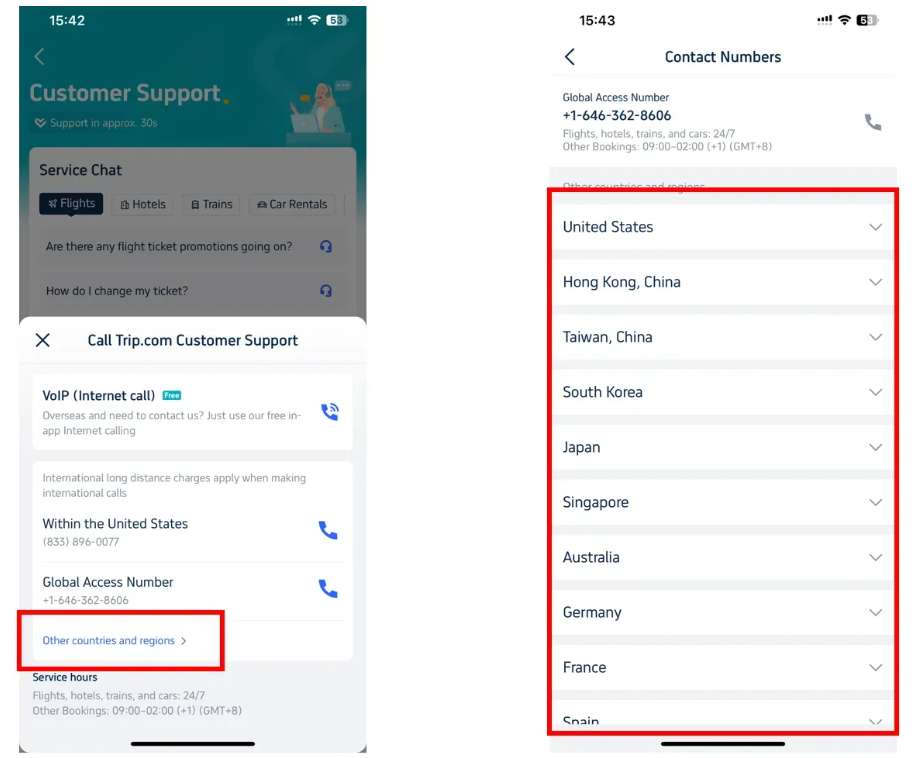
Global Access Numbers for International Callers
If you are traveling outside India, you can use Trip.com's global access numbers. International calling charges will apply depending on your mobile carrier and plan.
Core travel services on all global lines remain available 24/7, while support for other booking types follows regional operating schedules.
India Local Customer Care Number
For users calling from within India, Trip.com operates a dedicated domestic toll-free hotline for direct access to the local support team.
- India service number
- Service hours (New Delhi time), subject to change
- Flights, hotels, trains, and car rentals: 24 hours, 7 days a week
- Attractions, tours, and other bookings: 6:30 AM – 11:30 PM
How to Find Local Numbers for More Regions
Trip.com maintains dedicated local support numbers in over 40 countries and regions. For the most up-to-date contact for your location:
- On the desktop website: Visit the official Trip.com Help Center, scroll to the "Contact Us" section, click "Call Us", and select "Other countries and regions" from the dropdown menu to view the full list.
- On the Trip.com app: Go to Account > Customer Support > Call Us. The app will automatically recommend the most appropriate number based on your current location.
Disclaimer: Phone numbers, service hours, and support policies are subject to change. Always verify the latest official details via the Trip.com Help Center or Trip.com mobile app before contacting support.
Trip.com Call Center - In-App Calls (VoIP)
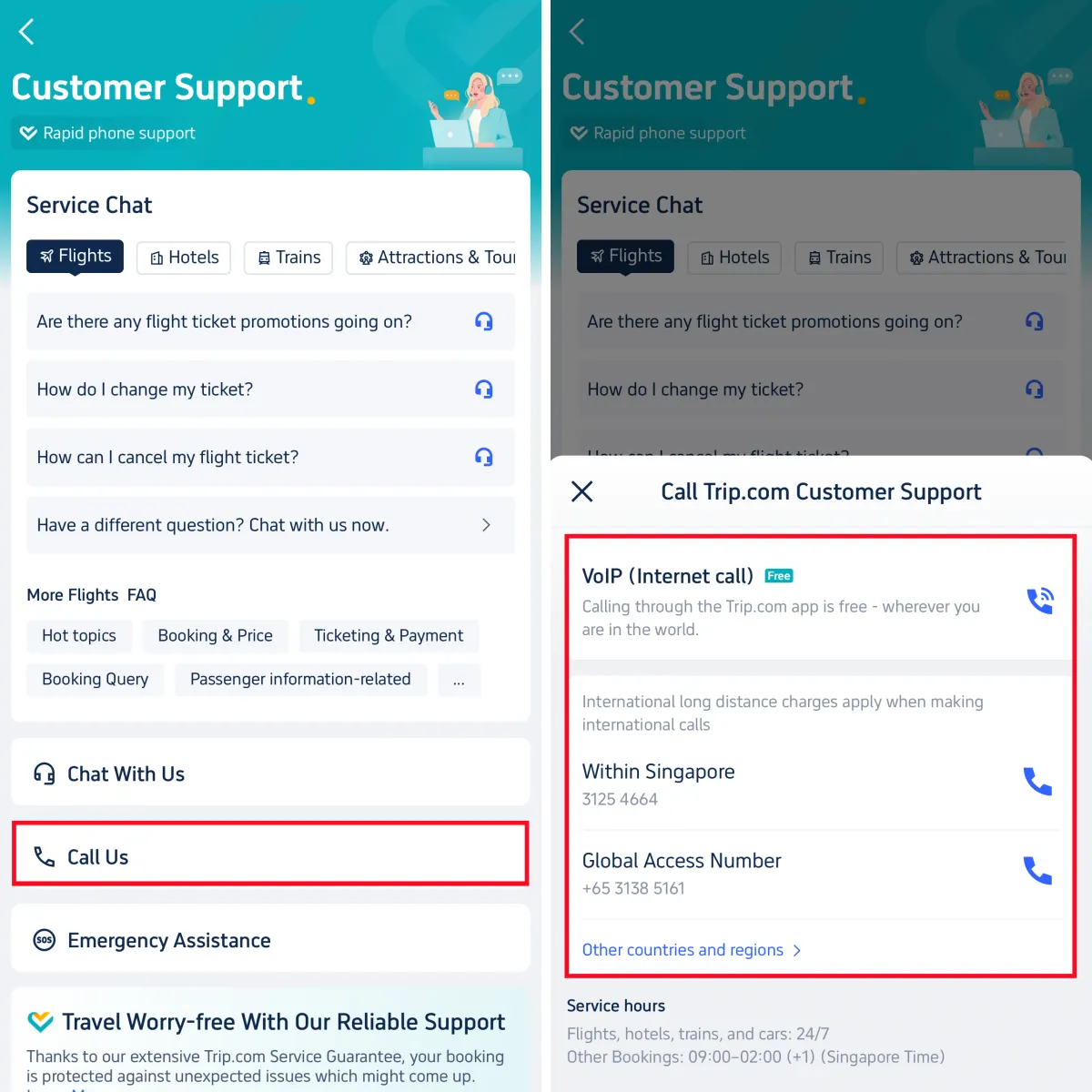
The in-app VoIP (Internet Call) feature is basically free for all Trip.com users worldwide. It works over Wi-Fi or mobile data, so you will not incur phone plan charges or international roaming fees. To use free in-app calling:
- Open the Trip.com app and sign in to your account
- Tap Account on the bottom navigation bar
- Select Customer Support, then tap Call Us
- Choose the VoIP (Internet Call) option
- Select your issue category and enter your booking ID if available
- Tap Connect to reach an agent
Typical wait time for VoIP calls ranges from 1 to 5 minutes. Since you are signed in, agents can view your booking details immediately, so you will not need to repeat your reservation information.
Trip.com Call Center - Live Chat
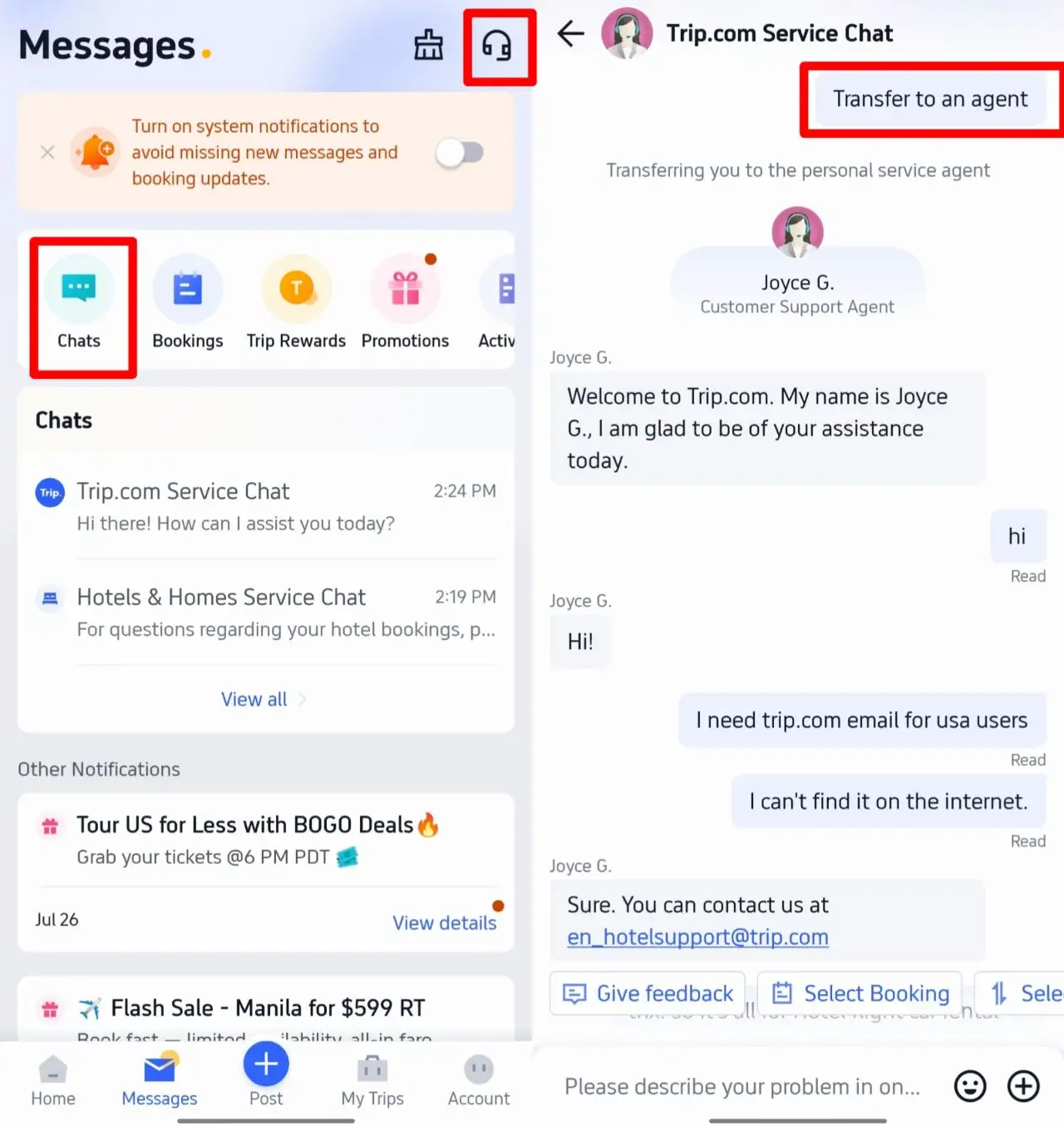
Live chat is a convenient text-based alternative to phone support, ideal for when you cannot speak, need a written record of your conversation, or want to share screenshots for faster troubleshooting.
To access live chat and connect with a human agent:
- Open the Trip.com app and go to Messages or Customer Support
- Tap Chat With Us
- Select the category matching your issue (flights, hotels, trains, etc.)
- An automated chatbot will respond first. To speak directly with a live agent, type "Transfer to an agent" in the chat box
Average wait time for live chat is approximately 30 seconds. You can attach screenshots of your booking or error messages to help agents resolve your issue more efficiently.
See all attractions
 2419 booked






Tips for Faster Trip.com Customer Support
- Have your booking ID ready: Providing your 10-digit booking number at the start speeds up verification and resolution.
- Contact support through the app: Agents can instantly access your account and booking history when you reach out via the signed-in app, and you can use the free VoIP calling option.
- Check FAQs first: Common questions about changes, cancellations, and policies often have instant answers in the Service Chat section, saving you from waiting.
- Note service hours by region: Core travel services have 24/7 support, but attractions and tours follow local operating schedules.
[10% Off] Trip.com Hotel Promo Codes
Search Top Global Hotels
See All Hotels







FAQs about Trip.com Call Center
-
Is the Trip.com in-app VoIP call really free?
-
How do I talk to a real person on Trip.com live chat?
-
What are Trip.com customer service hours?
-
Where can I find the latest Trip.com contact numbers for my country?
Disclaimer: This article has been provided by an individual contributor or third party platform. If there is any discrepancy regarding the copyright, please contact us directly and we will delete the content immediately.
Trending Searches
-
Popular Airlines